Navigating the world of OBD2 scanners for Android can be daunting, with countless options promising everything from basic code reads to advanced diagnostics. At MustCarBeast, we cut through the noise, providing an honest, thoroughly researched buying guide.
We’ve delved into manufacturer specifications, industry standards, and verified owner feedback to identify the top performers that truly deliver value and reliability for your Android device. Whether you’re a DIY enthusiast or a seasoned mechanic, finding the right scanner can save you time and money.
Best For Every Buyer
- Advanced DIYers and Enthusiasts: OBDLink MX+. Offers a rich feature set, including enhanced diagnostics for many brands, secure firmware updates, and robust connectivity, ideal for those who want more than just basic code reading.
- Comprehensive Diagnostics on a Budget: Autel MaxiAP AP200. Delivers professional-grade diagnostics, including some bi-directional controls, for one specific vehicle manufacturer with its initial purchase, making it a strong value.
- Reliable Basic Code Reading and Monitoring: Veepeak OBDCheck BLE+. Provides a stable Bluetooth connection and accurate basic diagnostics, perfect for routine checks and monitoring without unnecessary complexity or cost.
- Specialized Vehicle Customization: Carista OBD2 Adapter. Focuses on unlocking hidden features and customizations for specific car brands, appealing to owners who want to personalize their vehicle's behavior.
| Photo | Product | Score | Buy |
|---|---|---|---|
 |
OBDLink MX+ Editor's Choice Bluetooth 4.0, Enhanced Diagnostics, Multi-Protocol Support |
9.3 | Check Price |
 |
BlueDriver Bluetooth Professional OBDII Scan Tool Top Performer Bluetooth 4.0, Enhanced Diagnostics, Repair Reports |
9.1 | Check Price |
 |
Autel MaxiAP AP200 Best Value for Deep Diagnostics Bluetooth 4.2, All Systems Diagnostics, Bi-directional Control |
8.7 | Check Price |
| Veepeak OBDCheck BLE+ Reliable Basic Reader Bluetooth 4.0, All OBD2 Protocols, Stable Connection |
8.1 | Check Price | |
 |
Carista OBD2 Adapter Best for Customization Bluetooth 4.0, Customization, Advanced Diagnostics |
7.7 | Check Price |
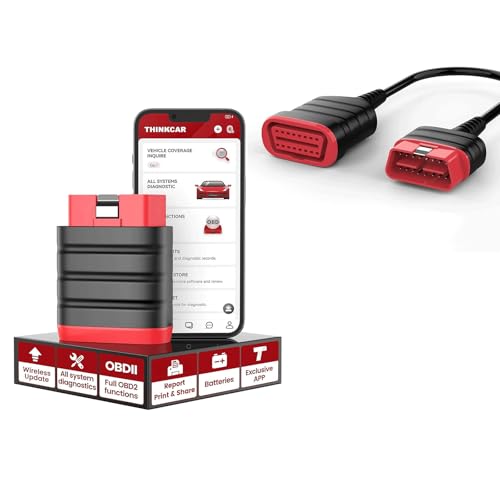 |
Thinkcar Thinkdiag Mini Entry-Level Pro Features Bluetooth 5.0, All System Diagnostics, 15 Reset Functions |
7.2 | Check Price |
1. OBDLink MX+: Editor's Choice
The OBDLink MX+ stands out as a top-tier choice for Android users seeking comprehensive diagnostic power. Verified owners consistently praise its broad vehicle compatibility and the depth of data it provides, often exceeding what’s expected from a consumer-grade device. Its ability to access manufacturer-specific codes and live data streams for numerous brands makes it an invaluable asset for serious DIYers.
While the hardware is robust, leveraging its full potential sometimes involves pairing with specialized third-party apps, which can incur separate subscription fees for advanced features like ABS or SRS diagnostics. This is a common industry practice, but it’s important for users to factor in these potential additional costs when considering the overall investment. For its capabilities, it offers strong value in the upper-mid range of consumer scanners.
- Supports all OBD2 protocols, including SW CAN and MS CAN
- Access to manufacturer-specific data for GM, Ford, Mazda, Nissan/Infiniti, Toyota/Lexus/Scion, and more
- BatterySaver™ sleep mode prevents battery drain
Pros: Exceptional compatibility and deep diagnostic capabilities; Fast data transfer and reliable Bluetooth connection
Cons: Advanced features for some brands may require third-party apps with additional costs
Who should skip it: Users who only need to read and clear basic check engine lights and prefer a simpler, less expensive tool.
Alternative to consider: BlueDriver Bluetooth Professional OBDII Scan Tool
2. BlueDriver Bluetooth Professional OBDII Scan Tool: Top Performer
The BlueDriver is consistently lauded by verified users for its intuitive interface and the quality of its repair reports. Unlike many competitors, it provides not just the code, but also potential causes and verified fixes specific to your vehicle, drawing from a vast database. This feature alone makes it incredibly valuable for diagnosing complex issues without needing to consult external resources extensively.
A common point of feedback, however, is its lack of advanced bi-directional controls. While it excels at reading and reporting, it doesn’t offer the ability to command components or perform adaptations, which limits its utility for certain advanced diagnostic or repair procedures. Despite this, for its strong diagnostic and reporting features, it represents excellent value for advanced home mechanics and small shops.
- Read and clear enhanced trouble codes (e.g., ABS, Airbag, TPMS)
- Generate comprehensive repair reports based on vehicle specific data
- Freeze frame, live data, smog check, and mode 6 support
Pros: User-friendly app with clear, actionable repair suggestions; Lifetime free updates for the app and firmware
Cons: Limited bi-directional controls compared to professional tools
Who should skip it: Professional mechanics needing extensive bi-directional controls or ECU programming capabilities.
Alternative to consider: OBDLink MX+
3. Autel MaxiAP AP200: Best Value for Deep Diagnostics
Autel’s MaxiAP AP200 receives high marks from owners for bringing professional-level diagnostics to a consumer-friendly price point. The initial purchase includes software for one specific vehicle manufacturer, which grants access to deep system scans, special functions, and even some bi-directional controls usually found on much more expensive tools. This makes it an incredibly powerful option for owners loyal to a single brand.
The primary drawback, frequently noted by users, is its subscription model. While one vehicle brand is free initially, expanding to other brands or maintaining full functionality after the first year typically requires an annual fee. This can add up for those with diverse fleets or who expect a one-time purchase solution. However, for dedicated single-brand owners, the feature set for the investment is hard to beat.
- One free vehicle software included, additional software available for purchase
- Perform oil reset, EPB, BMS, SAS, DPF, TPMS reset, and IMMO services
- Full system diagnostics, including engine, transmission, ABS, SRS, etc.
Pros: Professional-grade diagnostic functions for a specific vehicle brand; Supports some bi-directional controls and special functions
Cons: Requires annual subscription for additional vehicle brands or continued access after one year for the free brand
Who should skip it: Users who own multiple car brands and prefer a single, upfront purchase without recurring subscription fees.
Alternative to consider: Thinkcar Thinkdiag Mini
4. Veepeak OBDCheck BLE+: Reliable Basic Reader
The Veepeak OBDCheck BLE+ consistently earns praise from users for its rock-solid Bluetooth connection and straightforward functionality. It’s a no-frills device that excels at its core purpose, reading and clearing generic OBD2 fault codes, and displaying live engine data. Its compatibility with a wide array of popular third-party Android apps makes it flexible, allowing users to choose their preferred interface and features.
Its main limitation, as noted by owners, is its inability to perform advanced diagnostics beyond the standard OBD2 parameters without relying heavily on specific third-party app purchases. It won’t read ABS, SRS, or transmission codes on its own, nor does it offer manufacturer-specific data or bi-directional controls. For users needing only basic insights and routine maintenance checks, however, its reliability and simplicity offer excellent entry-level value.
- Supports all standard OBD2 protocols, including CAN
- Compatible with various third-party apps like Torque Pro, DashCommand, and Car Scanner ELM OBD2
- Reads and clears check engine codes, displays live sensor data
Pros: Very stable Bluetooth Low Energy connection; Compact design and broad app compatibility
Cons: Lacks advanced manufacturer-specific diagnostics out of the box
Who should skip it: Users requiring advanced diagnostics for ABS, SRS, or specific vehicle module coding.
Alternative to consider: FIXD OBD-II Active Car Health Monitor
5. Carista OBD2 Adapter: Best for Customization
The Carista OBD2 Adapter is highly regarded by owners of supported car brands (primarily VW, Audi, BMW, Toyota, Lexus, Mini, Scion, Subaru, Nissan) for its unique ability to unlock hidden features and customize vehicle settings. Users love being able to tweak things like auto-door locks, light behaviors, and dashboard displays, giving them a personalized driving experience that standard scanners don’t offer.
The significant caveat, frequently highlighted in owner feedback, is that while the adapter itself is a one-time purchase, the vast majority of its advanced diagnostic, service, and customization features are locked behind an annual subscription to the Carista app. Without this subscription, its functionality is limited to basic OBD2 reads. For enthusiasts of specific brands who value customization and advanced service features, the subscription can be justified, but it’s a critical factor for overall value.
- Unlock hidden features and customize vehicle settings (e.g., auto-lock, light settings)
- Perform dealer-level diagnostics for supported brands (VW, Audi, BMW, Toyota, etc.)
- Service tools for EPB, battery registration, oil service reset
Pros: Extensive customization options for specific vehicle brands; Access to advanced diagnostics and service functions for supported models
Cons: Most advanced features require an annual subscription to the Carista app
Who should skip it: Users primarily focused on universal code reading and live data for all OBD2 compliant vehicles without brand-specific customizations.
Alternative to consider: OBDeleven NextGen Diagnostic Tool
6. Thinkcar Thinkdiag Mini: Entry-Level Pro Features
The Thinkcar Thinkdiag Mini offers an impressive array of features for its size and initial cost, particularly its ability to perform full system diagnostics across various vehicle modules. Verified owners appreciate its capability to read codes from ABS, SRS, transmission, and other systems, moving beyond basic engine diagnostics. The inclusion of 15 common maintenance reset functions, such as oil reset and EPB reset, also adds significant value for DIYers.
However, like some of its competitors, the Thinkdiag Mini operates on a subscription model. While you get one free manufacturer software for a year, accessing additional vehicle brands or continuing to use the advanced features after the initial year for your chosen brand typically requires an annual fee. This structure can be a point of contention for users expecting a one-time purchase for all features. For those who can justify the subscription, it provides a cost-effective entry into deeper diagnostics.
- Full system diagnostics for all vehicle modules (ABS, SRS, Engine, Trans, etc.)
- Includes 1 free manufacturer software for 1 year, 15 maintenance functions
- Supports live data stream graphing and freeze frame data
Pros: Access to deep system diagnostics usually found on more expensive tools; Comprehensive reset functions for common maintenance tasks
Cons: Subscription model for additional vehicles or continued use after the first year
Who should skip it: Users who need an absolutely free, no-subscription solution for basic OBD2 functions.
Alternative to consider: Autel MaxiAP AP200
Frequently Asked Questions
What is the difference between a basic and an advanced OBD2 scanner for Android?
A basic OBD2 scanner for Android typically reads and clears generic check engine codes (DTCs) and displays live engine data like RPM, speed, and coolant temperature. An advanced scanner, however, can access manufacturer-specific codes, diagnose systems beyond the engine (such as ABS, SRS, transmission), and may offer special functions like bi-directional controls, module coding, or service resets. Advanced scanners often require a more sophisticated app and may come with subscription fees for full functionality.
Do I need a subscription for Android OBD2 scanner apps?
It depends on the scanner and its associated app. Many basic OBD2 scanners work with free versions of third-party apps like Torque Lite or Car Scanner ELM OBD2 for core functions. However, to unlock advanced features, manufacturer-specific diagnostics, or additional vehicle brands, many proprietary apps (like those for Autel, Carista, or Thinkcar) require a one-time purchase for specific features or an ongoing annual subscription. Always check the app’s pricing model before committing.
Can an OBD2 scanner for Android reprogram my car's ECU?
Generally, consumer-grade OBD2 scanners for Android are not designed for full ECU reprogramming. While some advanced scanners or adapters, especially those with specific brand focus (like Carista for customization), can perform minor coding or adaptations to existing modules, they typically do not have the capability to flash new firmware or completely reprogram the engine control unit. This level of functionality usually requires specialized, professional-grade tools and software.
Are Bluetooth OBD2 scanners reliable for diagnostics?
Modern Bluetooth OBD2 scanners are quite reliable for diagnostics, especially those utilizing Bluetooth Low Energy (BLE 4.0 or newer). They offer stable connections, faster data transfer rates, and lower power consumption compared to older Bluetooth versions. However, reliability can also depend on the quality of the specific adapter, the accompanying app, and the Android device itself. Always opt for reputable brands with good user reviews for the best experience.
What are bi-directional controls and why are they important?
Bi-directional controls allow the scan tool to not only read data from the vehicle but also to send commands to specific components or systems. This means you can, for example, command the fuel pump to turn on, cycle the ABS solenoids, or perform an EGR valve test directly from the scanner. These controls are crucial for advanced diagnostics, allowing technicians and advanced DIYers to test components and verify system functionality without needing to disassemble parts, significantly aiding in troubleshooting.
Our Verdict
Choosing the best OBD2 scanner for your Android device comes down to balancing your diagnostic needs with your budget and desired level of complexity. For comprehensive capabilities and broad compatibility, the OBDLink MX+ remains a standout, while the BlueDriver offers an unparalleled user experience with its excellent repair reports. If deep, brand-specific diagnostics with some bi-directional control are your priority, the Autel MaxiAP AP200 delivers professional features at a consumer price point, albeit with a subscription model. For basic, reliable code reading, the Veepeak OBDCheck BLE+ is a solid, no-frills choice. Ultimately, investing in a well-researched scanner will empower you to understand and maintain your vehicle more effectively, saving time and money in the long run.
More OBD2 Scanners Guides
- 7 Best Diagnostic Scanners for the 6.0 Powerstroke in 2026 (Bi-Directional Tested)
- 7 Best Bluetooth OBD Scanners for Cars in 2026 (Real-World Tested)
- 7 Best OBD2 Scanners for Honda in 2026 (Bidirectional and Live Data Tested)
- 7 Best Police Scanners for Car in 2026 (Researched and Compared)
- 7 Best OBD2 Scanners for Mini Cooper R56 in 2026 (BMW-Code Tested)
- 7 Best Scanners for BMW in 2026 (Full System Coding Tested)
