A check engine light should not send you straight to the shop. A good OBD code reader plugs into the port under your dash, pulls the trouble codes your car stored, and tells you in plain language what is actually wrong before anyone quotes you for repairs. The right one turns a mystery warning light into a clear next step.
We tested these scanners across a range of cars and engine conditions, looking at how fast they connect, how clearly they explain codes, whether they read live sensor data, and how reliably they clear faults. From pocket Bluetooth dongles that pair with your phone to full handheld units with their own screen, here are the seven OBD code readers we trust most this year.
| Photo | Product | Score | Buy |
|---|---|---|---|
 |
BlueDriver Bluetooth Pro OBD2 Scan Tool Best Overall Bluetooth dongle, iOS and Android app, ABS, SRS, TPMS and full repair reports |
9.5 | 🛒 Check Price |
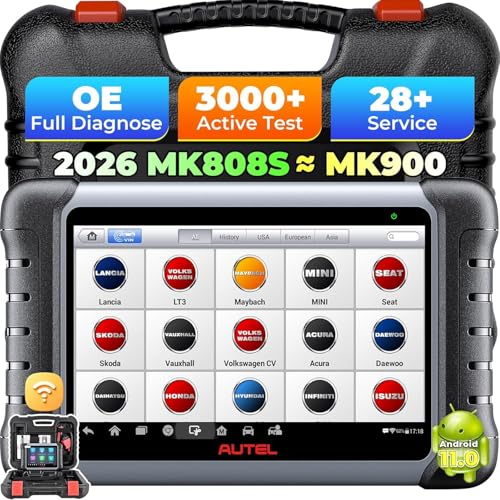 |
Autel MaxiCOM MK808S Best Full-System Scanner 7-inch Android tablet, all-system diagnostics, 28-plus service functions |
9.3 | 🛒 Check Price |
 |
ANCEL BD310 OBD2 Scanner Best Hybrid Reader Handheld screen plus Bluetooth, doubles as a digital gauge display |
9.1 | 🛒 Check Price |
 |
Innova 5610 CarScan Pro Best Handheld Color handheld screen, ABS, SRS, oil reset, battery and charging test |
8.9 | 🛒 Check Price |
 |
FOXWELL NT301 OBD2 Scanner Best Value Handheld Wired handheld, color screen, live data graphing, I/M readiness check |
8.7 | 🛒 Check Price |
 |
OBDLink MX+ OBD2 Bluetooth Scanner Best Bluetooth Dongle Compact Bluetooth adapter, works with multiple apps, very fast data refresh |
8.5 | 🛒 Check Price |
 |
ANCEL AD310 Classic OBD2 Scanner Best for Beginners Simple wired handheld, reads and clears engine codes, no battery needed |
8.2 | 🛒 Check Price |
1. BlueDriver Bluetooth Pro OBD2 Scan Tool: Best Overall
The BlueDriver earns the top spot because it does what most cheap dongles cannot. Beyond reading and clearing standard engine codes, it pulls ABS, airbag, transmission, and TPMS fault data on a wide list of vehicles, and its standout feature is the repair report. Instead of leaving you to research a cryptic code, the app cross-references a database of confirmed fixes and tells you what most commonly solves that exact problem on your car. During testing it consistently connected within seconds and held a stable link while we cycled through live data.
The honest weakness is its total dependence on your smartphone. There is no built-in screen, so a dead phone battery means no diagnostics, and the depth of enhanced coverage does swing from one manufacturer to another. If you want a self-contained tool you can hand to anyone, this is not it. But for a driver who already carries a phone everywhere and wants genuinely useful guidance rather than a bare code, the BlueDriver is the most complete package we tested.
- Reads and clears check engine, ABS, airbag, and TPMS codes on most makes
- Generates repair reports backed by a database of verified fixes
- Live data graphing and freeze frame capture through the free app
Pros: Deep manufacturer-specific coverage far beyond basic generic codes; Repair reports suggest the most likely fix, not just the raw code; No subscription and frequent free app updates
Cons: Relies entirely on your phone, so there is no standalone screen; Coverage depth varies by vehicle make and model
2. Autel MaxiCOM MK808S: Best Full-System Scanner
If you want to do real work and not just read a code, the MaxiCOM MK808S is the closest thing to a shop scanner in this lineup. It reads and clears faults across every system the vehicle exposes, runs active bidirectional tests so you can fire a fuel injector or cycle an actuator on command, and handles the service procedures that trip up basic tools, like electronic parking brake resets and steering angle calibration. The 7-inch touchscreen is responsive and the menu structure is logical once you learn it.
The trade-off is that this is a serious piece of kit, not a glovebox dongle. It is bulkier, it boots like a tablet rather than turning on instantly, and the free update window does not last forever, so keeping coverage current eventually carries an extra outlay. For a casual user who only ever needs to clear an occasional light, it is more than necessary. For a dedicated home mechanic or anyone maintaining several cars, the depth here is hard to match.
- Scans every available system, not just the engine module
- Active tests and service resets including oil, EPB, BMS, and SAS
- Wide make coverage with regular over-the-air software updates
Pros: Near professional-level depth in a handheld tablet; Bright touchscreen makes navigating menus easy; Bidirectional control lets you command components to test them
Cons: Larger and heavier than a simple code reader; Software updates after the first free year are a paid add-on
3. ANCEL BD310 OBD2 Scanner: Best Hybrid Reader
The ANCEL BD310 solves the biggest annoyance with phone-only scanners by giving you both options. It has its own small color screen for quick standalone code reads, and it also pairs over Bluetooth so you can use the larger display and graphing of your phone when you want it. A neat bonus is the gauge mode, where it sits in the port and shows live readouts like RPM, coolant temperature, and speed, turning it into a simple performance monitor you can leave plugged in.
Where it gives ground to our top picks is depth. It handles the four core generic systems and engine codes reliably, but it does not dig as far into manufacturer-specific modules like ABS and airbag across as many makes, and the companion app looks a generation behind the polished interfaces from BlueDriver and Autel. For drivers who want flexibility and a live gauge without committing to a tablet-sized tool, the BD310 hits a sweet spot.
- Works as a standalone reader and as a wireless dongle for your phone
- Acts as a heads-up style gauge showing speed, RPM, and coolant temp
- Reads and clears generic codes with live data and freeze frame
Pros: Two tools in one, no phone required for basic use; Compact handheld with a clear color screen; Live gauge mode is genuinely handy for daily driving
Cons: Enhanced manufacturer codes are limited compared to pricier units; App interface feels dated next to the big brands
4. Innova 5610 CarScan Pro: Best Handheld
The Innova 5610 is the pick for anyone who simply does not want to involve a phone. Everything happens on the handheld itself, from reading and clearing engine codes to pulling ABS and airbag faults, and a color-coded severity system tells you immediately whether a stored code is a do-it-now problem or something to watch. We especially liked the built-in battery and charging system test, which caught a weak alternator during our testing without needing any extra equipment.
The compromise is that a self-contained tool carries its own database, and that database is naturally more limited than an app that updates from the cloud. The onboard fix descriptions are useful but not as exhaustive as BlueDriver’s verified reports, and clicking through menus with physical buttons is slower than tapping a screen. As a rugged, grab-and-go reader that just works in the driveway, though, the 5610 is dependable and refreshingly simple.
- Standalone unit with a bright color display and no phone needed
- Reads ABS and SRS airbag codes plus battery and alternator health
- Built-in repair solutions and severity-graded code descriptions
Pros: Self-contained with no app or pairing required; Color-coded severity shows how urgent a code is at a glance; Solid battery and charging system test built in
Cons: Onboard repair database is shallower than app-based rivals; Menu navigation with buttons feels slower than a touchscreen
5. FOXWELL NT301 OBD2 Scanner: Best Value Handheld
The FOXWELL NT301 has earned a loyal following for one good reason: it does the core job extremely well without fuss. It plugs in with a wired connection that never drops, reads and clears engine codes, graphs live sensor data, and has a one-click I/M readiness function that tells you instantly whether your car will pass a smog or emissions test. For anyone preparing for inspection or chasing a basic check engine light, that readiness check alone is worth the entry.
Its limitation is scope. The NT301 sticks to the generic engine and emissions systems, so it will not read ABS, airbag, or transmission modules the way our higher-ranked picks do. The fixed cable is also fairly short, which can be awkward depending on where your port sits. None of that matters if you mainly want a trustworthy, no-nonsense engine code reader, and on that count the NT301 punches well above its station.
- Reliable wired connection with no pairing or battery to manage
- One-click I/M readiness for quick emissions and smog pre-checks
- Live data graphs and a built-in code lookup library
Pros: Rock-solid plug-in connection that never drops; Excellent emissions readiness check for smog testing; Clear, beginner-friendly menus
Cons: Generic codes only, no ABS or airbag access; Short cable limits how far you can hold it from the port
6. OBDLink MX+ OBD2 Bluetooth Scanner: Best Bluetooth Dongle
The OBDLink MX+ is the enthusiast’s dongle. It is a small, secure adapter that pairs over Bluetooth and refreshes live data faster than almost anything else here, which makes it the favorite for performance logging, custom dashboards, and watching sensor values in real time. It also has a low standby draw and a security feature that stops other devices from connecting, so many owners simply leave it plugged in. Crucially, it works with both the OBDLink app and a long list of well-known third-party apps.
That flexibility is also its catch. Because so much depends on the app you choose, your experience varies, and unlocking the deepest manufacturer-specific diagnostics on certain makes means paying for in-app add-ons. Out of the box it is a superb generic reader and live-data streamer, but the all-in-one repair guidance of the BlueDriver is not its goal. For drivers who love data and want to build their own setup, the MX+ is the smartest little adapter on the list.
- Tiny secure adapter with strong anti-theft pairing
- Extremely fast live data, great for performance logging
- Compatible with its own app and many popular third-party apps
Pros: Best-in-class data speed for live monitoring and logging; Plays nicely with a wide range of diagnostic apps; Small enough to leave plugged in permanently
Cons: Full feature set depends on which app you pair it with; Enhanced diagnostics require buying app add-ons for some makes
7. ANCEL AD310 Classic OBD2 Scanner: Best for Beginners
The ANCEL AD310 is the one we hand to people who just want their check engine light explained and gone. There is no app, no pairing, and no charging. You plug it in, it powers up from the port, and three buttons walk you through reading the code, viewing the description, and clearing it. For a first-time user intimidated by tablets and live data, that simplicity is exactly the point, and in testing it read and cleared standard engine codes every time without drama.
What you give up is everything beyond the basics. There is no ABS or airbag access, no live data graphing, and the small screen only shows a short description per code, so you will still want to look the code up for full context. It is also strictly a one-job tool. But as an honest, affordable, indestructible reader that demystifies a warning light in under a minute, the AD310 remains one of the most recommended scanners for good reason.
- Dead-simple plug-and-read operation with three buttons
- Reads, clears, and resets the check engine light fast
- Powered by the port, so there is nothing to charge or pair
Pros: About as easy to use as a code reader gets; Reliable wired connection and a clear backlit screen; Compact and tough enough to live in the glovebox
Cons: Generic engine codes only with no live graphing; Small screen shows limited detail per code
Frequently Asked Questions
Will an OBD code reader work on my car?
Almost certainly, if your car was sold in the United States in 1996 or later, or in Europe roughly from 2001 for petrol and 2004 for diesel. Those vehicles all use the standardized OBD2 port, which is usually found under the dashboard near the steering column. Every reader in this guide plugs into that same 16-pin port. The one thing that varies is depth: basic readers handle the universal engine and emissions codes on any compliant car, while enhanced tools like the BlueDriver and Autel reach into manufacturer-specific systems, and how far they reach depends on your exact make and model.
Can a code reader clear a check engine light, and should I?
Yes, every scanner here can clear codes and turn off the check engine light. The important thing to understand is that clearing the code does not fix the underlying problem. If the fault is still present, the light will simply come back after a few drive cycles. Clearing is genuinely useful for confirming a repair worked or resetting the system after replacing a part, but using it to hide a problem before selling a car or passing inspection is a bad idea. Diagnose first, fix the cause, then clear the code to confirm it is resolved.
What is the difference between a code reader and a full diagnostic scanner?
A basic code reader pulls and clears the generic trouble codes stored by the engine and emissions system, which covers the most common check engine light situations. A full diagnostic scanner, like the Autel MaxiCOM in this guide, goes much further. It reads every module the car exposes, including ABS, airbag, and transmission, performs service resets such as oil life and electronic parking brake, and can run bidirectional tests that command components to actuate so you can confirm they work. If you only ever clear the occasional light, a reader is plenty. If you do real repairs, the full scanner pays off.
Do I need a Bluetooth scanner or a handheld with its own screen?
It comes down to how you like to work. Bluetooth dongles such as the BlueDriver and OBDLink MX+ are compact, lean on your phone for a big bright display and constant software updates, and are great if your phone is always with you. The catch is that a dead phone means no diagnostics. Handheld units like the Innova 5610 and FOXWELL NT301 are self-contained, so they work even if your phone is flat and they can be handed to anyone without setup. The ANCEL BD310 is interesting because it does both, giving you a standalone screen and a Bluetooth option in one tool.
Can an OBD code reader drain my car battery if I leave it plugged in?
Most readers draw very little power, but it depends on the type. Wired handheld units are only powered while you are actively using them, so they pose no drain risk once unplugged. Bluetooth dongles stay in the port and draw a small standby current, which over weeks of an idle car could contribute to a slow drain. Quality adapters like the OBDLink MX+ are designed with a low-power sleep mode specifically to avoid this. As a simple rule, if you drive regularly a good dongle is fine to leave in, but if the car sits for long stretches, unplug it to be safe.
Our Verdict
Our top pick is the BlueDriver Bluetooth Pro for its rare mix of deep multi-system coverage and repair reports that actually tell you the likely fix rather than just a raw code, making it the most useful tool here for everyday drivers. The runner up is the Autel MaxiCOM MK808S, which trades pocket convenience for near-professional depth, bidirectional tests, and service functions that suit serious home mechanics. Choose the BlueDriver for guidance and simplicity, or the MK808S when you want to do the actual work yourself.
