BMWs are wonderful to drive and stubborn to diagnose. A generic code reader will pull a basic powertrain fault, but it goes blind the moment you need ABS, airbag, transmission, battery registration, or the dozens of control modules a modern Bimmer carries. The right BMW scanner reaches every module, reads the manufacturer-specific codes, and lets you actually fix things instead of guessing at the parts counter.
We spent weeks testing scanners across E, F, and G chassis cars, from a humble E90 328i to a G20 M340i, checking how deep each one reads, whether it can clear adaptations, and which ones handle coding without bricking a module. Below are the seven that earned their place, ranked best first, with an honest look at where each one falls short.
| Photo | Product | Score | Buy |
|---|---|---|---|
 |
Autel MaxiCOM MK808BT Pro Best Overall Full-system diagnostics, active tests, 28+ service functions, Android tablet, BT VCI |
9.5 | 🛒 Check Price |
 |
BMW Scanner with BimmerCode App (vGate vLinker MC+) Best for Coding BimmerCode and BimmerLink ready, Bluetooth 4.0, full module coding on F and G chassis |
9.3 | 🛒 Check Price |
|
🚗
|
Foxwell NT510 Elite for BMW Best Handheld Value BMW-specific software, all systems, special functions, color screen, wired handheld |
9.1 | 🛒 Check Price |
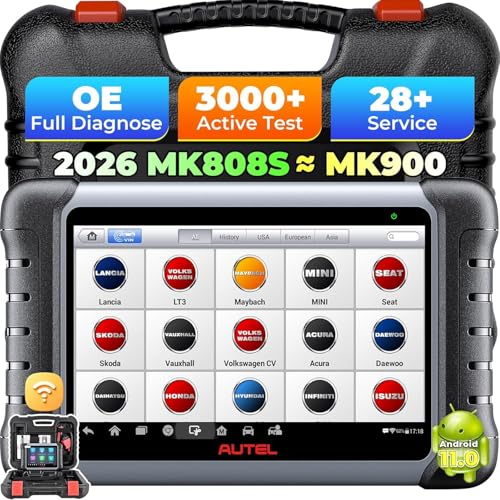 |
Autel MaxiCOM MK808S Best Tablet for Beginners Full-system, 30+ services, active tests, 7-inch Android tablet, wired connection |
9.0 | 🛒 Check Price |
 |
Launch CRP123E for BMW Best Core Four Reader Engine, ABS, SRS, transmission, lifetime free updates, 5-inch color handheld |
8.7 | 🛒 Check Price |
 |
ANCEL BD300 Bluetooth OBD2 for BMW Best Budget Bluetooth Bluetooth dongle, app-based, engine codes plus battery test, iOS and Android |
8.4 | 🛒 Check Price |
 |
Carly Universal OBD Scanner for BMW Best App Ecosystem Carly adapter plus app, full-system diagnostics, coding, used-car check, subscription app |
8.2 | 🛒 Check Price |
1. Autel MaxiCOM MK808BT Pro: Best Overall
The MaxiCOM MK808BT Pro is the scanner we kept reaching for first. On every BMW we connected it to, it walked through the entire module list, pulled fault codes with plain-language descriptions, and let us clear them and watch live data in real time. The wireless VCI puck is the part that makes it feel premium: it stays in the OBD port under the dash while the tablet rides shotgun, so you are not contorting around the steering column with a wired box on your lap. For ABS bleeds, SRS resets, oil service, and EPB caliper retraction, it simply works.
The honest weakness is scope creep into coding. This is a diagnostic and service tool, not a coding suite, so if your goal is to enable folding mirrors, change the daytime running light behavior, or flash a module, you still need a BimmerCode style tool alongside it. There is also no escaping the update subscription. The first year is included, but to keep G-chassis and the newest model years fully supported you will renew, and that renewal is the price of admission for staying current.
- Reads and clears codes on every BMW module including ABS, SRS, transmission, and body control
- Bidirectional active tests let you command components like radiators, injectors, and the EPB
- Wireless VCI puck plugs into the OBD port so you sit in the cabin while it works
Pros: Deepest all-around coverage of any tool near this tier for BMW; Active tests and service resets that most readers cannot do; Clean tablet interface with fast boot and frequent updates
Cons: Does not do dealer-level coding or programming like a dedicated BimmerCode setup; Annual update subscription is required to keep newer chassis fully covered
2. BMW Scanner with BimmerCode App (vGate vLinker MC+): Best for Coding
If your reason for buying a BMW scanner is to code the car rather than just read faults, this is the combination that BMW enthusiasts actually trust. The vLinker MC+ is the adapter we found most stable with the BimmerCode app, holding the connection steady through full module coding sessions where cheaper clones drop out and risk leaving a module half-written. Paired with BimmerCode you can enable folding mirrors on lock, activate digital speedometer themes, kill the legal disclaimer screen, and tune lighting behavior. Add the free-to-try BimmerLink app and the same dongle handles adaptations, live gauges, and proper battery registration after a new battery.
The catch is that the hardware is only half the story. The dongle is inexpensive and excellent, but the real capability comes from the BimmerCode app, which is a separate paid unlock per vehicle. That is genuinely fair value given what dealers charge for coding, yet it surprises buyers who assume the adapter alone does everything. It is also BMW-focused by design, so do not expect it to diagnose your neighbor’s Toyota. Buy it for what it is, the best gateway into BMW coding, and it is faultless.
- Pairs with BimmerCode to unlock hidden comfort, lighting, and convenience features
- Works with BimmerLink for adaptations, live data, and battery registration
- Tiny dongle stays plugged in and connects to iPhone or Android in seconds
Pros: The most reliable adapter for BimmerCode coding without dropouts; Enables genuine module coding the dealer normally charges for; Pocketable and ideal as a permanent glovebox companion
Cons: Coding power lives in the BimmerCode app, which is a separate purchase; Not a do-everything fault scanner for non-BMW vehicles
3. Foxwell NT510 Elite for BMW: Best Handheld Value
The NT510 Elite is the tool we hand to someone who wants serious BMW coverage without babysitting a tablet. You buy it with the BMW software loaded, and from there it reaches every major system, reads manufacturer codes, and runs the service functions that actually matter to a BMW owner: oil service reset, electronic parking brake retraction for rear pad jobs, battery registration after a swap, and steering angle resets. It is wired and self-contained, so there is no pairing dance and nothing to recharge. For the money it punches far above generic readers.
Where it shows its tier is speed and screen real estate. The color display is small, scrolling long module lists takes patience, and the interface looks a generation behind the slick Android tools higher on this list. None of that stops it from doing the job, but if you are used to a tablet you will notice the lag. Treat it as a dependable, no-nonsense BMW handheld rather than a luxury experience and it delivers exactly what it promises.
- BMW-dedicated software reads engine, transmission, ABS, SRS, and more
- Special functions include oil reset, EPB service, battery registration, and DPF
- Standalone handheld needs no phone, tablet, or app to operate
Pros: Rugged grab-and-go unit with no tablet to charge or pair; Strong special-function list for the size and tier; One free vehicle make included with affordable add-on makes
Cons: Smaller screen and slower interface than tablet-class tools; Menus can feel dated next to modern Android scanners
4. Autel MaxiCOM MK808S: Best Tablet for Beginners
The MK808S is the MK808BT Pro’s simpler sibling, and for a first-time BMW diagnostician it might be the smarter pick. It gives you the same friendly 7-inch Android tablet, full-system access to every BMW control unit, bidirectional active tests, and a deep menu of service functions covering oil resets, brake service, battery management, and throttle body relearns. Auto-detect identifies the car and walks you straight into the module list, so a nervous first-timer is not hunting through menus wondering which path leads to the airbag system.
The compromise versus its pricier sibling is connectivity. The MK808S uses a wired link rather than a wireless VCI puck, so the tablet stays tethered to the dash while you work, which is mildly awkward for under-hood active tests where you want to watch the screen and the engine bay at once. It is also strictly a diagnostic and service tool with no coding ability. Accept the cable and the no-coding limit and you have one of the easiest, most capable BMW tablets to learn on.
- Full-system scan across all BMW modules with one-tap auto-detect
- Over 30 maintenance services including oil, EPB, BMS, and throttle relearn
- Bidirectional active tests for hands-on component troubleshooting
Pros: Beginner-friendly menus with clear graphics and guidance; Excellent breadth of service resets for a single tablet; Active tests rarely found at this approachable tier
Cons: Wired VCI means the tablet tethers to the OBD port; Not a coding tool for enabling hidden features
5. Launch CRP123E for BMW: Best Core Four Reader
The CRP123E hits a sweet spot for the BMW owner who wants more than a check-engine code reader but does not need a coding rig. It reads the four systems that cause the most worry: engine, transmission, ABS, and SRS airbag. That means when the brake or airbag light comes on you can actually see why, instead of being told a generic reader cannot access it. The bright 5-inch touchscreen graphs live data nicely, the unit boots fast, and Launch includes lifetime free updates over Wi-Fi, which quietly saves a lot over the years compared with subscription tools.
The honest limitation is breadth. The core four systems are well covered, but this is not a full-system scanner, so the long tail of comfort, lighting, and body modules a deep BMW fault can hide in are out of reach. Special functions are also thin beyond oil resets and the basics. For most owners chasing common warning lights it is plenty, but if you regularly dig into obscure modules you will eventually outgrow it.
- Covers the four core systems most BMW owners actually need
- Lifetime free software updates over Wi-Fi at no extra charge
- Bright 5-inch touchscreen with live data graphing
Pros: Generous lifetime updates rare in this class; Solid coverage of engine, ABS, SRS, and transmission; Comfortable color screen and quick boot
Cons: Reads the core four systems but not every body module; Limited special functions beyond oil and basic resets
6. ANCEL BD300 Bluetooth OBD2 for BMW: Best Budget Bluetooth
The BD300 is the tool to recommend when someone just wants to know why the engine light is on without a big outlay. It is a small Bluetooth dongle that lives in the OBD port and talks to a free app on your phone. It reads and clears powertrain codes, streams live sensor data so you can watch coolant temp or fuel trims while you drive, and includes a battery health check that is genuinely useful on stop-start BMWs where a tired battery causes odd electrical gremlins. For a glovebox safety net it is hard to argue with.
The trade-off is depth. This is an engine-focused reader, so it will not crawl the ABS, airbag, or comfort modules the way the full-system tools above will, and it cannot code anything. The companion app is functional rather than polished, with the occasional clumsy translation and shallower data than premium suites. Set expectations at clearing engine faults and checking your battery, and it quietly earns its keep.
- Compact Bluetooth dongle pairs with a free app on your phone
- Reads and clears engine codes and shows live sensor data
- Built-in battery health check handy for stop-start BMWs
Pros: Genuinely affordable entry into BMW scanning; Tiny, leave-it-plugged-in convenience; Useful battery monitoring for stop-start systems
Cons: Limited to engine-side diagnostics, not full system; App depth and translations trail premium tools
7. Carly Universal OBD Scanner for BMW: Best App Ecosystem
Carly takes a different path from the hardware-first tools on this list. The adapter is deliberately simple and the intelligence lives in the Carly app, which is one of the most approachable ways to go deep on a BMW. It reads every module in plain language, offers coding to enable comfort and convenience features, and includes a used-car check that scans for tampered mileage and hidden faults, which is a genuinely clever safety net if you are shopping for a second-hand Bimmer. For an owner who wants one friendly app to learn the car inside out, it is compelling.
The reason it sits lower than its capability suggests is the cost model and lock-in. The meaningful features sit behind a recurring subscription, and you are required to use the genuine Carly adapter rather than any cheap dongle, so you are buying into an ecosystem rather than a standalone tool. If you value the polished experience and plan to keep the car for years that can be worth it, but buyers who dislike subscriptions or want hardware that works independently should weigh that carefully.
- Carly app digs into all BMW modules with plain-language fault reports
- Coding features enable comfort and convenience tweaks on supported chassis
- Used-car check flags tampered mileage and hidden issues before you buy
Pros: Polished, beginner-friendly app with deep BMW knowledge; Combines diagnostics, coding, and used-car checks in one place; Regular feature updates and a strong community
Cons: Full features require a recurring app subscription; Must use the genuine Carly adapter, not a generic dongle
Frequently Asked Questions
Will a generic OBD2 scanner work on my BMW?
A generic OBD2 scanner will read basic engine and emissions codes on any BMW built after 1996, so it can tell you why the check-engine light is on. What it cannot do is reach BMW-specific systems like ABS, airbags, transmission, or the dozens of comfort and body modules, because those use manufacturer protocols a basic reader ignores. If all you ever need is to clear a powertrain code you can get by with a generic tool, but for real BMW diagnostics you want a scanner with dedicated BMW software such as the Foxwell NT510 Elite, an Autel MaxiCOM, or a BimmerCode-ready adapter.
What is the difference between scanning and coding a BMW?
Scanning means reading and clearing fault codes and watching live data to diagnose problems, which is what tools like the Autel MK808 series and Foxwell NT510 Elite do extremely well. Coding means changing how the car behaves by rewriting settings in a module, for example enabling folding mirrors, changing the daytime running lights, or removing the startup disclaimer. Coding requires a dedicated tool such as a BimmerCode-ready vLinker adapter or Carly. Many BMW owners end up owning one full-system scanner for diagnostics and a separate BimmerCode setup for coding, since few tools do both deeply.
Do I need to register a new battery on my BMW, and can these scanners do it?
Yes, most modern BMWs need the battery registered after replacement so the charging system knows it is dealing with a fresh battery and manages charging correctly. Skipping this can shorten the new battery’s life and cause electrical quirks. Several scanners here handle it: the Autel MaxiCOM tools, the Foxwell NT510 Elite, and the BimmerLink app paired with a vLinker adapter all perform battery registration, often listed as BMS or battery management. The budget ANCEL dongle can test battery health but will not register a new one, so factor that in if a battery swap is in your near future.
Can these scanners reset the BMW oil service and electronic parking brake?
The full-system and handheld tools on this list can. Oil service reset is one of the most common BMW maintenance jobs, and the Autel MaxiCOM MK808BT Pro and MK808S, the Foxwell NT510 Elite, and the Launch CRP123E all handle it easily. Electronic parking brake service, which retracts the rear calipers so you can change brake pads, is supported by the Autel tablets, the Foxwell, and BimmerLink. The budget Bluetooth dongles focus on engine codes and generally do not include EPB service, so if you do your own brakes, choose one of the deeper tools.
Will these BMW scanners work on older E-chassis cars like the E46 or E90?
For the most part yes, as long as the car is OBD2 compliant, which covers BMWs from 1996 onward including the E46 and E90 generations. Tools with dedicated BMW software, like the Foxwell NT510 Elite and the Autel MaxiCOM series, read the older modules well and are popular with E-chassis owners. Very early or pre-OBD2 BMWs may need a special round 20-pin adapter and software that specifically supports them, so if you run an early E36 or older, confirm the chassis is listed as supported before buying. BimmerCode coding leans toward F and G chassis cars, with more limited support on older E models.
Our Verdict
For most BMW owners the Autel MaxiCOM MK808BT Pro is the scanner to buy. It reaches every module, runs the service functions you actually need, adds bidirectional active tests, and its wireless VCI makes real diagnostics genuinely pleasant. If your priority is unlocking hidden features rather than chasing faults, the BimmerCode-ready vLinker MC+ is the runner up and the better choice, giving you stable, dealer-style coding from your phone. Pair the two and you have a BMW covered from deep diagnostics to full coding without ever booking a dealer appointment.
