BMWs are wonderful to drive and frustrating to diagnose. A generic OBD2 reader will pull a basic engine code, but it will go silent the moment a BMW throws a fault in the transmission, the iDrive system, the airbag module, or the dozens of other control units that make these cars feel special. To actually understand what your BMW is telling you, you need a scanner that speaks the manufacturer language, not just the universal one.
We tested seven OBD2 scanners across E-chassis, F-chassis, and the newer G-chassis BMWs, checking how deep each one reads, whether it can clear stubborn adaptation faults, and how reliable the connection stays. Whether you just want to kill a check engine light before an inspection or you want full module coding, there is an option here that fits how hands-on you plan to get.
| Photo | Product | Score | Buy |
|---|---|---|---|
 |
Carly Universal OBD2 Adapter for BMW Best Overall for BMW Bluetooth adapter paired with the Carly app, full BMW system coverage plus coding |
9.5 | 🛒 Check Price |
 |
BimmerCode OBD2 Adapter (OBDLink CX) Best for Coding Bluetooth 5.1 BLE adapter paired with the BimmerCode app, coding focused for BMW and MINI |
9.3 | 🛒 Check Price |
|
🚗
|
FOXWELL NT510 Elite for BMW Best Handheld Scanner Standalone handheld with BMW software package, full system scan plus bidirectional tests |
9.1 | 🛒 Check Price |
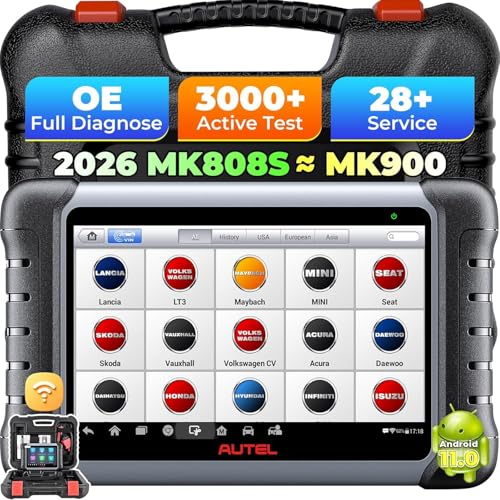 |
Autel MaxiCOM MK808 Best All Around Tablet Android touchscreen tablet, all system diagnostics with broad multi brand coverage |
8.9 | 🛒 Check Price |
|
🚗
|
ANCEL BM700 Full System Scanner Best Value Full System BMW dedicated handheld, full system diagnostics with common service resets |
8.6 | 🛒 Check Price |
 |
BlueDriver Bluetooth Pro OBDII Scan Tool Best for Beginners Bluetooth dongle paired with the free BlueDriver app, generic OBD2 plus enhanced BMW data |
8.3 | 🛒 Check Price |
 |
BAFX Products Bluetooth OBD2 Adapter Best Budget Adapter Bluetooth ELM327 style adapter for Android, works with third party BMW apps |
8.0 | 🛒 Check Price |
1. Carly Universal OBD2 Adapter for BMW: Best Overall for BMW
Carly is the tool we reached for again and again because it treats a BMW like a BMW. The small Bluetooth adapter plugs into the OBD2 port under the dash, and the app then walks through every module the car has, translating cryptic fault memory into sentences a normal owner can act on. On an F30 we used it to clear a phantom airbag light caused by a seat occupancy sensor, something a basic reader could not even see. The coding side is where enthusiasts will spend hours, enabling features like folding mirrors on lock and digital speedometers that BMW left dormant from the factory.
The honest weakness is the subscription model. The adapter is a one time purchase, but the genuinely useful coding and live diagnostics are gated behind a paid app tier, and you pick your brand at activation, so a Carly tied to BMW will not fully serve a different car later. Coverage on the latest G-chassis vehicles is also still maturing, so a brand new model may expose fewer coding options than a ten year old one. For a dedicated BMW owner, though, nothing else in this list gets this deep.
- Reads every control unit, not just the engine, including transmission, airbags, and comfort modules
- Coding features unlock factory hidden options like video in motion and digital speed display
- Used car check feature flags tampered mileage and inconsistent module data
Pros: Deepest BMW-specific diagnostics of any consumer tool we tested; Plain language fault explanations instead of raw hex codes; Active coding and adaptation resets work across most chassis
Cons: Many advanced features sit behind an app subscription; The newest G-chassis cars have partial coding support compared to older models
2. BimmerCode OBD2 Adapter (OBDLink CX): Best for Coding
BimmerCode pairs the OBDLink CX adapter with an app built from the ground up for BMW and MINI coding, and it shows. Where other tools bury customization options, BimmerCode lays them out module by module with plain descriptions of what each change does. We enabled comfort access window control and disabled the legal disclaimer nag screen on an F-series in minutes, and the app warned us before any change that might cause an issue. The OBDLink CX adapter uses Bluetooth Low Energy, which is what makes it dependable on newer G-chassis cars that reject older Bluetooth modules.
What BimmerCode is not is a deep fault reader. It will help you understand and clear coding related issues, but for chasing a misfire across fuel, ignition, and sensor data you will want one of the dedicated diagnostic units below. There is also a hardware catch worth knowing: the coding reliability depends heavily on using a quality adapter like the CX, and the bargain clones people pair with it are exactly where coding sessions go wrong. Buy the matched adapter and the experience is excellent.
- Designed specifically for BMW and MINI module coding rather than generic diagnostics
- Bluetooth Low Energy adapter works reliably on both iOS and Android
- One click presets for popular customizations reduce the risk of coding errors
Pros: Best coding experience for BMW owners who want to personalize their car; Stable connection on F and G chassis where many cheap adapters drop out; Active community and clear documentation for each codeable feature
Cons: Focused on coding, so fault diagnostics are lighter than a full scan tool; Some features require the right matching adapter, not just any cheap clone
3. FOXWELL NT510 Elite for BMW: Best Handheld Scanner
If you do not want diagnostics living on your phone, the FOXWELL NT510 Elite is the handheld to get. You buy it with the BMW software loaded, plug the unit straight into the OBD2 port, and get full system access without any app or login. We used it to register a new battery on an F10 so the charging system would stop overcharging the fresh cell, then ran an active test to cycle the cooling fan on command. That bidirectional ability, sending commands to components rather than only reading faults, is what separates it from the readers most people own.
The compromise is the experience. The screen and menus feel like a tool from an earlier generation, and navigating deep menus with buttons takes patience compared to a touchscreen app. The license model also matters: it ships covering BMW, and adding other manufacturers later asks more of you, so this is best bought by someone who is staying in the BMW world. For a no nonsense, self contained BMW scanner, it earns its place.
- All system diagnostics covering engine, transmission, ABS, SRS, and body modules
- Bidirectional active tests let you command components instead of just reading them
- Service functions include oil reset, EPB, battery registration, and throttle adaptation
Pros: No phone or subscription needed, everything runs on the handheld; Bidirectional control is rare at this level and genuinely useful; BMW battery registration and service resets work cleanly
Cons: The dedicated handheld feels dated next to a modern app interface; One brand license is included, extra makes cost more to add
4. Autel MaxiCOM MK808: Best All Around Tablet
The Autel MaxiCOM MK808 is the tool to pick if your driveway holds a BMW and something else. It is a self contained Android tablet with a clear touchscreen, and its strength is breadth: full system diagnostics and a long list of service functions that cover most makes well, not just BMW. On a BMW specifically we ran oil service resets, steering angle calibration, and electronic parking brake routines without trouble, and the responsive interface made the work feel quick rather than fiddly.
Where it gives ground to the specialists is coding. The MK808 reads and clears BMW faults across systems and handles maintenance resets confidently, but it will not unlock the deep factory coding options that Carly and BimmerCode live for. Coverage on the freshest BMW models can also trail behind, since a generalist tool spreads its development across many brands. As a versatile household scanner that handles a BMW competently, it is hard to beat.
- Bright touchscreen tablet with full system scan across most modern vehicles
- Over 25 service functions including oil reset, EPB, SAS, BMS, and DPF
- Wide vehicle coverage makes it useful for a multi car household, not just BMW
Pros: Fast, modern tablet interface that is easy to read and navigate; Strong service functions for routine BMW maintenance resets; Covers many other makes if you own more than one brand
Cons: Coding and deep BMW personalization are limited compared to BMW only tools; Coverage on the very newest BMW chassis can lag behind dealer level tools
5. ANCEL BM700 Full System Scanner: Best Value Full System
The ANCEL BM700 is built specifically for BMW owners who want real full system access without stepping up to a premium ecosystem. It is a standalone handheld, no phone or subscription involved, and it reads faults across all the major modules rather than stopping at the engine. We used it to register a battery and reset the oil service interval on an E90, the two jobs most BMW owners actually need a scanner for, and it handled both cleanly. For someone who just wants to maintain their car and clear the occasional fault, it covers the essentials.
Its limits are predictable for a value tool. There is no coding or factory feature unlocking here, so anyone dreaming of enabling hidden options should look at Carly or BimmerCode instead. Software updates also come less often than from the bigger names, which means the newest chassis may not be supported as quickly. As an affordable, dependable BMW maintenance scanner, though, the BM700 delivers more than its modest positioning suggests.
- Full system fault reading across engine, transmission, ABS, SRS, and more
- BMW focused service functions including oil reset, EPB, and battery registration
- Standalone handheld with no subscription or app required to operate
Pros: Strong full system coverage for a budget friendly dedicated tool; No subscription, the handheld works out of the box; Battery registration and service resets handle common BMW maintenance
Cons: No advanced coding or feature personalization; Software updates arrive less frequently than premium brands
6. BlueDriver Bluetooth Pro OBDII Scan Tool: Best for Beginners
BlueDriver is the gentle on ramp for an owner who has never used a scanner before. The Bluetooth dongle plugs in, pairs with a polished free app, and within a minute you have a fault code, a description, and a repair report that ranks the most likely fixes based on how often that code is solved a given way. For a BMW owner who simply wants to know whether the check engine light means something serious before a road trip, that guidance is reassuring and genuinely useful.
It is honest to say this is not a BMW specialist. BlueDriver does offer enhanced diagnostics that reach past generic OBD2 on some BMW systems, but it does not approach the module by module depth of Carly or the FOXWELL, and there is no coding or bidirectional testing at all. Think of it as the best general purpose entry tool that happens to work on a BMW, rather than a tool built around the brand. For beginners, that trade is exactly right.
- Plug and play Bluetooth dongle with a clean, beginner friendly app
- Repair reports suggest likely fixes based on reported fault frequency
- Enhanced diagnostics reach beyond generic codes on supported BMW systems
Pros: Extremely easy to set up and understand for first time users; Repair report feature helps owners decide what to fix first; No subscription, the companion app is free to use
Cons: BMW module depth is shallower than dedicated BMW tools; No coding or bidirectional control
7. BAFX Products Bluetooth OBD2 Adapter: Best Budget Adapter
The BAFX Products Bluetooth adapter is the budget gateway for tinkerers who already lean toward Android. On its own it is a simple ELM327 style dongle that reads generic codes and streams live data, but its real value is flexibility: pair it with a capable third party BMW app and you can pull surprisingly detailed chassis specific data without spending much on hardware. For someone learning their car and willing to experiment with apps, it is a low commitment way in.
The catch is that the adapter is only as smart as the app you connect it to, and it is Android only, so iPhone owners should look elsewhere. It will not code, it will not run bidirectional tests, and the deeper BMW features depend on choosing the right software partner. Treated for what it is, an honest, dependable Bluetooth adapter for Android users who like to tinker, it does its job well and asks very little in return.
- Inexpensive Bluetooth adapter that pairs with many free and paid Android apps
- Reads and clears generic engine codes and live sensor data
- Compatible with popular BMW apps for deeper chassis specific data on Android
Pros: Very affordable entry point into BMW diagnostics; Flexible, works with a wide range of third party apps; Reliable for basic code reading and live data logging
Cons: Android only, with no native iPhone support; Depth depends entirely on the paired app, not the adapter itself
Frequently Asked Questions
Will a generic OBD2 scanner work on a BMW?
Yes, any standard OBD2 scanner will plug into a BMW built from 1996 onward and read generic engine codes, which is enough to find out why a check engine light is on. The problem is that BMWs run dozens of control modules beyond the engine, covering the transmission, airbags, ABS, comfort systems, and iDrive, and a generic tool cannot see faults in any of those. For real BMW diagnostics you want a scanner with BMW specific or full system coverage, like Carly, the FOXWELL NT510 Elite, or the ANCEL BM700, which read the manufacturer modules a basic reader ignores.
What does coding a BMW actually mean and do I need it?
Coding is changing the software settings inside a BMW control module to enable, disable, or adjust features the car already supports in hardware. People use it to turn on things like folding mirrors when locking, a digital speed display, video playback while moving, or to remove warning nag screens. You do not need coding to diagnose or maintain your car, so if your goal is reading and clearing faults, any full system scanner is enough. If you want to personalize your BMW, then a coding focused tool like BimmerCode with the OBDLink CX adapter, or Carly, is what you need.
Why do I have to register a new battery on a BMW?
Modern BMWs use intelligent charging that tracks the age and condition of the battery to manage how the alternator charges it. If you fit a new battery without telling the car, it keeps charging based on the old worn battery profile, which overcharges the fresh one and shortens its life. Battery registration resets that profile so the charging system treats the new battery correctly. Several scanners here handle it, including the FOXWELL NT510 Elite, the Autel MaxiCOM MK808, and the ANCEL BM700, which is why registration capability is worth checking before you buy.
What is bidirectional control and which scanner has it?
Bidirectional control, sometimes called active testing, lets the scanner send commands to the car instead of only reading data from it. That means you can tell a component to run, such as cycling a cooling fan, activating a fuel pump, or bleeding the electronic parking brake, which makes diagnosing a faulty part far faster. Most basic readers cannot do this. In this guide the FOXWELL NT510 Elite and the Autel MaxiCOM MK808 both offer bidirectional functions, making them the strongest picks for owners who want to test components rather than just read fault codes.
Do these BMW scanners work on iPhone or only Android?
It depends on the tool. App based options like Carly, BimmerCode with the OBDLink CX, and BlueDriver are designed to work on both iPhone and Android, because they use Bluetooth modules built for Apple compatibility. The BAFX Products adapter is Android only and will not pair natively with an iPhone, so iOS users should avoid it. The standalone handhelds, the FOXWELL NT510 Elite, ANCEL BM700, and Autel MaxiCOM MK808, sidestep the question entirely since they run everything on the device itself and never need a phone.
Our Verdict
For most BMW owners, the Carly Universal OBD2 Adapter is the best overall choice because it combines the deepest full system diagnostics with real coding and plain language fault explanations, all in one app that grows with how hands-on you become. Our runner up is BimmerCode with the OBDLink CX adapter, which is the tool to get if customization and reliable coding on newer F and G chassis cars are your priority. If you would rather avoid phones and subscriptions entirely, the FOXWELL NT510 Elite handheld delivers full system access and bidirectional control on its own. Pick the one that matches how deep you plan to go, and your BMW will stop keeping secrets.
