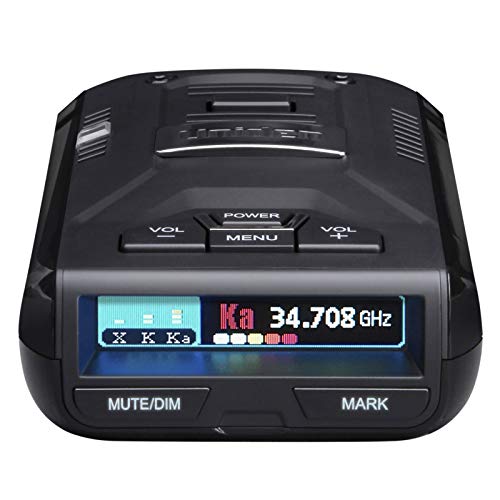
Ka band is the main frequency band that modern police radar uses, so it is the single most important signal your radar detector needs to catch. When a unit picks up Ka quickly and at long range, you gain extra seconds to react before an officer locks onto your speed. That early warning is the whole reason drivers invest in a sensitive radar detector in the first place.
Understanding what Ka band is, how it differs from older bands, and how your device filters it will help you read alerts correctly and avoid being startled by false signals. This guide breaks down Ka band in plain terms and shows you how to make the most of it on any detector you own.
What Ka Band Is and Why It Matters Most
Ka band is a slice of the radio spectrum that police speed radar broadcasts on, roughly in the 33.4 to 36.0 GHz range. Almost every radar gun sold to law enforcement today operates inside this range, which is why Ka detection is the headline feature of any serious detector.
Older bands like X band and K band still exist, but X band is mostly retired and K band now triggers many false alerts from automatic door openers and driver assistance systems. Ka band, by contrast, almost always means a genuine radar source. A detector that excels at Ka gives you the most reliable and meaningful warnings, which is why reviewers weigh Ka range and sensitivity above nearly every other metric.
How Detectors Handle Ka Segments and Using Ka Filtering
Ka band is wide, so detectors scan several narrow segments within it to find active radar. Sweeping fewer segments speeds up the response time, while scanning all of them improves coverage. Good units balance both so you get fast, accurate Ka alerts, and the best radar detectors handle these segments quickly. Here is how to set up and use Ka filtering on most detectors:
- Open the menu and find the band settings screen.
- Confirm that Ka band detection is switched on, since it is the priority band.
- Enable any Ka segment scanning option if your model offers it.
- Turn on false alert filtering so non radar noise gets ignored.
- Drive a familiar route and note how the detector reacts to known sources.
- Adjust segment scanning until alerts feel fast without becoming jumpy.
Once dialed in, your detector will flag real Ka radar quickly while staying quiet around harmless signals.
Features to Look For
When you judge a detector by its Ka performance, focus on a few core qualities. Long Ka detection range tops the list, because more distance means more reaction time. Strong sensitivity lets the unit hear faint Ka signals from far away or from behind hills and curves.
Fast response speed matters too, since some radar guns transmit in brief bursts. Look for clear band identification so you instantly know a Ka alert from a K band one. Reliable false filtering keeps the cabin calm, and a readable display or distinct audio tone helps you trust each warning at a glance. Together these traits separate a capable detector from a frustrating one.
Mistakes to Avoid
Drivers often undercut their own gear with simple errors. Keep these in mind:
- Disabling Ka band to cut down on noise, which removes your most important protection.
- Ignoring firmware updates that improve Ka filtering and accuracy.
- Mounting the unit low or behind tinted glass that weakens Ka reception.
- Treating every Ka chirp as a threat without reading the signal strength.
- Buying a cheap model that scans Ka slowly and alerts too late.
- Forgetting to re enable Ka after using a quiet city mode.
Avoiding these slips keeps your Ka detection sharp and dependable on every drive.
When Ka Sensitivity Is the Deciding Factor
Ka sensitivity becomes the deciding factor when you regularly drive open highways, rural roads, or zones in which officers use radar from a distance. In these settings the extra range from a sensitive Ka receiver translates directly into more warning time and a calmer reaction.
If your driving is mostly slow city traffic, raw Ka range matters a little less, and false filtering moves up in importance. But for anyone covering serious miles at speed, Ka sensitivity is the metric that should drive the buying decision. When two models look similar on paper, the one with stronger Ka performance is almost always the smarter choice.
Frequently Asked Questions
Is Ka band the same as K band?
No. Ka band and K band are separate frequency ranges. Ka band, around 33 to 36 GHz, is what most modern police radar uses, while K band is older and triggers more false alerts from everyday electronics.
Should I leave Ka band turned on at all times?
Yes. Ka band is the primary band police radar transmits on, so leaving it enabled is essential. Turning it off removes your most reliable source of genuine radar warnings.
Does longer Ka range really make a difference?
Yes. Greater Ka range means your detector hears radar sooner, giving you more time to react. On highways and open roads, that added warning distance is often the most valuable feature a detector offers.
The Bottom Line
Ka band is the heart of modern radar detection, so it deserves the most attention when you compare units or fine tune your settings. A detector that locks onto Ka quickly, reaches far, and filters out noise will keep you informed without constant false alarms. By keeping Ka enabled, updating firmware, and mounting your device well, you get the early warnings that make the whole investment worthwhile. If you are ready to upgrade, choosing the right detector with strong Ka performance is the surest way to drive with confidence.
Related Guides
Last reviewed: May 28, 2026.
