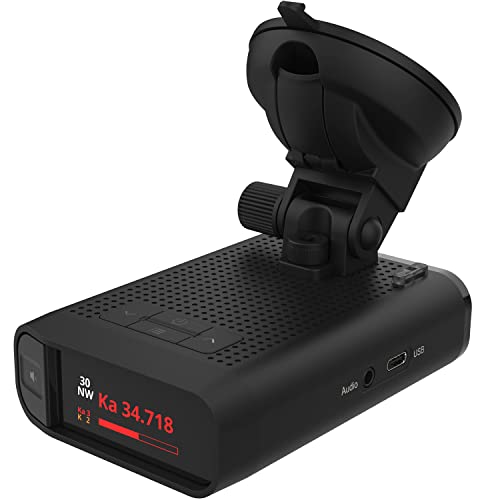
K band is one of the radio frequencies your radar detector listens for, and it is used by some police radar guns. The catch is that K band is also used by many modern car safety systems, so it false-alerts a lot. That means a single K-band beep does not always mean a speed trap is ahead. Learning to read these alerts is the difference between a calm drive and constant nervous braking.
If you want fewer junk warnings and clearer signals, the hardware matters. A good radar detector with strong K-band filtering can tell real threats from the noise your own neighborhood traffic creates. Below we explain what K band is, why it is so noisy, and how to respond like a seasoned driver instead of jumping at every chirp.
What K band is and why it is so noisy
K band sits around the 24 gigahertz range of the radio spectrum. Police agencies have used K-band radar guns for decades to clock vehicle speed, which is why your detector is built to catch it. The trouble is that the same frequency band now overlaps with everyday driver-assist technology.
Blind spot monitoring, adaptive cruise control, and collision warning systems on many newer cars emit signals close to K band. As you drive past these vehicles, your detector picks up their emissions and sounds an alert. Automatic doors at stores and some industrial sensors add more chatter. The result is a frequency that is useful for catching radar but crowded with harmless sources, so false alerts pile up fast in busy areas.
How to handle K-band alerts step by step
When a K-band alert sounds, stay calm and work through it in order rather than slamming the brakes.
- Note the signal strength on your display; a weak alert that fades quickly is usually a passing car, not a parked patrol unit.
- Scan the road ahead and to the sides for a vehicle with driver-assist features that could be the source.
- Watch how the alert behaves; a real radar source tends to grow stronger steadily as you approach it.
- Check for fixed sources nearby such as store entrances, sliding doors, or industrial buildings.
- If the alert ramps up and holds, ease off the accelerator and confirm your speed is legal before anything else.
- Once you pass the source and the alert clears, return to normal driving without overreacting.
Working this short checklist keeps you responsive without turning every beep into a panic.
Features to look for
Not every device handles K band the same way, so a few capabilities make daily driving far less stressful. Strong K-band filtering is the headline feature, since it learns to mute repeat false sources without ignoring genuine radar. Many of the best radar detectors now use software that recognizes the steady drone of driver-assist systems and quiets it down.
Look for good signal-strength metering so you can judge whether an alert is rising or fading. GPS-based memory is another big help, because it lets the unit remember a spot that false-alerts often and silence it there automatically. Clear audio and visual cues round out the list, letting you read a threat at a glance instead of guessing.
Mistakes to avoid
A few common habits turn a helpful tool into a frustrating one. Steer clear of these:
- Turning K band off entirely; this is the biggest error, because you would also blind yourself to the real police radar that uses it.
- Braking hard at every chirp, which is unsafe for traffic behind you and trains bad reflexes.
- Ignoring signal strength and treating all alerts as equal threats.
- Mounting the unit low or behind tint, which weakens its reception and confuses its readings.
- Skipping firmware updates that improve false-alert filtering over time.
Keep K band switched on and lean on filtering and good judgment instead of disabling the band you most need.
When K-band filtering matters
Filtering matters most in places dense with driver-assist traffic. City commutes, busy highways, and parking-heavy retail strips throw off a constant stream of K-band noise, and without filtering your detector would beep almost nonstop. In those settings strong filtering keeps you sane and lets the rare real alert stand out.
On open rural roads the calculus shifts. There are fewer cars with radar-based safety gear, so a K-band alert carries more weight and is more likely to be genuine. Knowing your surroundings helps you trust the alert appropriately. The smartest approach is to keep K band active at all times and let modern filtering do the heavy lifting so you react to threats that truly matter.
Frequently Asked Questions
Do police still use K band?
Yes. Many agencies still run K-band radar guns, which is exactly why you should keep the band enabled even though it produces frequent false alerts from passing cars.
Why does my detector beep on K band so often?
Most false K-band alerts come from blind spot monitors, adaptive cruise control, and collision systems on nearby vehicles, plus automatic store doors. They share frequencies close to police radar.
Should I turn off K band to stop false alerts?
No. Disabling K band would also hide genuine police radar. Instead rely on K-band filtering, signal strength, and GPS memory to cut the noise while staying protected.
The Bottom Line
K band is loud and busy because it serves both police radar and a growing fleet of car safety systems, so false alerts are simply part of the territory. The fix is not to silence the band but to read each alert with patience, watch signal strength, and lean on smart filtering. Choosing the right detector with capable K-band handling turns a noisy nuisance into a tool you can actually trust, letting you stay alert to real threats while you tune out the everyday chatter around you.
Related Guides
Last reviewed: June 20, 2026.
