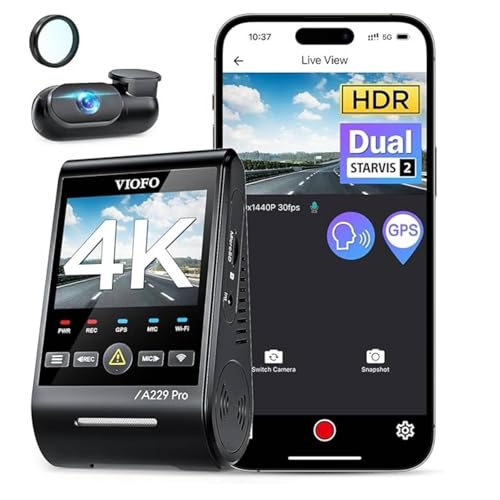
Most modern dash cams either include GPS or offer it as an add-on, yet plenty of drivers are unsure what it actually does. GPS does not change your video quality or your field of view. Instead it records where you were and how fast you were going, then ties that data to the moment it was captured. This guide explains what GPS adds to a dash cam, how built-in and external antennas differ, how accurate the data really is, the privacy trade-offs of logging your location, and how to decide whether the feature is worth it for you.
What GPS Actually Adds to a Dash Cam
A dash cam with GPS does three main things. First, it stamps your speed and your location directly onto the footage, usually as a small overlay along the bottom of the frame or stored quietly in the file so you can show or hide it later. Second, it maps your route inside the companion viewer app, so you can scrub through a journey on a map and jump straight to the clip that matches a point on the road. Third, it timestamps everything against satellite time, which keeps the clock accurate without you ever setting it.
The practical payoff shows up when something goes wrong. If another driver disputes how fast you were travelling, the recorded speed sits right there in the file. If you need to describe exactly where an incident happened, the map and coordinates remove the guesswork. None of this improves picture sharpness, but it adds context that plain video simply cannot provide on its own.
Built-In GPS vs External Antenna Mounts
There are two common ways a dash cam receives a satellite signal. Built-in GPS places the receiver inside the camera body, so there is nothing extra to plug in and nothing else to mount. It is the tidiest option and works well in most cars. The trade-off is that the receiver sits behind the windscreen and close to the camera electronics, which can slow down the initial satellite lock or weaken reception in vehicles with heavily tinted or metallic heat-reflective glass.
An external GPS antenna separates the receiver from the camera and connects by a thin cable. You position the small puck higher on the windscreen or near the headliner where it has a cleaner view of the sky. This usually means a faster first fix and steadier tracking, which matters if your glass blocks signal or you want the most reliable location data. The downside is one more cable to route and a small module to stick down. Some mounts combine the antenna into the windscreen bracket itself, which keeps the install clean while still moving the receiver away from the camera body.
How Accurate Is Dash Cam GPS
Consumer GPS in a dash cam is generally accurate to within a handful of metres on the map, which is more than enough to identify a junction, a stretch of road, or a car park. Speed readings are usually close to your speedometer, and in many cases the GPS figure is the more honest number because car speedometers are often calibrated to read slightly high by design.
Accuracy is not perfect, though. The signal can drift or drop in tunnels, multi-storey car parks, dense city streets hemmed in by tall buildings, and under heavy tree cover. After a fix is lost the camera needs a short window to reacquire satellites, so the first few seconds of a journey or the moments leaving a covered car park may show a gap or a brief jump on the map. For everyday evidence and route logging these limitations are minor, but it is worth knowing the data is a strong indicator rather than a laboratory-grade measurement.
Privacy Considerations of Logging Your Location
GPS logging means your dash cam is quietly building a record of where you drive and when. On its own, stored locally on the memory card in your own vehicle, that is usually low risk and entirely under your control. The picture changes when footage is shared. A clip you hand over or post online may carry your home address, your workplace, your routine, and your speed baked into the file, so it pays to review and trim what an overlay reveals before sending anything out.
Cloud-connected cameras add another layer to think about, because route and location history may sync to an account or a server. If that matters to you, check whether the GPS overlay can be switched off, whether location data is stored separately from the video, and what the manufacturer does with anything uploaded. Many cameras let you keep GPS active for the timestamp and speed benefits while hiding the on-screen position, which is a sensible middle ground for drivers who want the evidence value without broadcasting their exact coordinates.
Do You Actually Need GPS on a Dash Cam
GPS is most useful if you drive for work, cover long distances, want the strongest possible evidence in a dispute, or simply like reviewing your journeys on a map. In those situations the recorded speed and location turn a clip into a far more convincing account of what happened, and the route map makes long recordings much easier to navigate. For many drivers that added context alone justifies choosing a camera that includes it.
If you only want a basic safety net for the occasional bump, a camera without GPS still captures clear video of an incident, and the file timestamp gives you a rough sense of when. The honest answer is that GPS is a helpful enhancement rather than a strict necessity. Decide based on how much you value speed and location proof, then weigh the small privacy considerations of logging where you go against the reassurance that detailed records can provide.
Frequently Asked Questions
Does dash cam GPS drain my car battery?
No. The GPS receiver draws a tiny amount of power and runs only while the camera is on, which in most setups is when the engine is running. It has no meaningful effect on your battery beyond the small load the camera already places on the system.
Can I turn off the GPS overlay but keep GPS running?
On most cameras, yes. You can usually hide the on-screen speed and location while still letting GPS set the accurate timestamp and log the route in the app. This lets you keep the benefits without baking your position into the visible footage you might share.
Is external GPS worth it over the built-in receiver?
It can be if your windscreen has heavy tint or metallic heat-reflective glass, or if you want the fastest satellite lock and the steadiest tracking. For most ordinary cars the built-in receiver is perfectly adequate, so an external antenna is more of a reliability upgrade than a requirement.
The Bottom Line
GPS turns a dash cam from a simple video recorder into a richer record of your drive, stamping speed and location onto footage, mapping your route in the app, and keeping the clock accurate without effort. Built-in receivers suit most cars while external antennas help where glass blocks the signal, and the data is accurate enough for everyday evidence as long as you accept the odd drop in tunnels and covered car parks. Weigh the privacy side of logging where you go, and decide based on how much you value that extra context. If you want a camera that gets these fundamentals right, start with our guide to the best dash cams.
Related Guides
- 7 Best Dash Cameras for Vehicles (Researched and Compared)
- Best 4K Dash Cams (Researched and Compared)
- 7 Best Rear Dash Cams for Car in 2026 (Researched and Compared)
- 7 Best Dash Cams for Optimal Windshield Placement in 2026 (Researched and Compared)
- Best Dash Cams for Lyft Drivers (Researched and Compared)
- How to Reset a Dash Cam That Keeps Looping the Same Footage
