We researched and compared the top tablets for car dashboard use, evaluating brightness, GPS accuracy, durability under heat, and ease of mounting. Our analysis is based on manufacturer specifications, published industry standards, and aggregated owner feedback from thousands of reviews. This guide will help you choose the right tablet for navigation, media, and vehicle monitoring.
| Photo | Product | Score | Buy |
|---|---|---|---|
|
🚗
|
Samsung Galaxy Tab Active5 Best Rugged Tablet for Dashboard 8.0-inch display, IP68 water/dust resistance, MIL-STD-810H, replaceable battery |
9.0 | 🛒 Check Price |
 |
Apple iPad 10th Gen (2022) Best iPad for Dashboard 10.9-inch Liquid Retina display, A14 Bionic chip, 64GB/256GB |
8.7 | 🛒 Check Price |
 |
Samsung Galaxy Tab S9 FE Best Value Android Tablet 10.9-inch TFT LCD, Exynos 1380, IP68 water/dust resistance, 128GB |
8.4 | 🛒 Check Price |
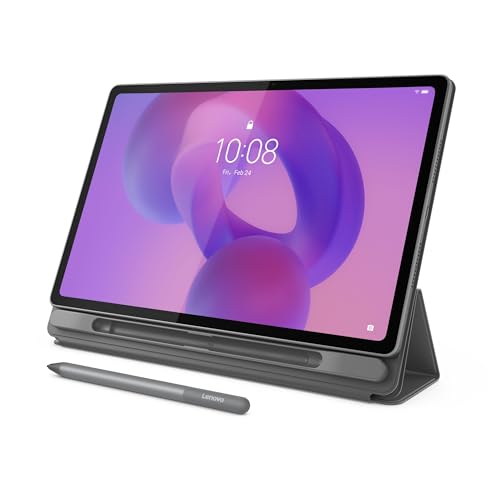 |
Lenovo Tab P12 Best Large Screen for Navigation 12.7-inch 3K IPS display, MediaTek Dimensity 7050, 128GB/256GB |
8.1 | 🛒 Check Price |
|
🚗
|
Amazon Fire Max 11 Best Budget Option 11-inch 2K display, MediaTek MT8188J, 64GB/128GB, Alexa hands-free |
7.8 | 🛒 Check Price |
|
🚗
|
Microsoft Surface Go 4 Best Windows Tablet for Dashboard 10.5-inch PixelSense display, Intel N200, 8GB/128GB, Windows 11 |
7.3 | 🛒 Check Price |
|
🚗
|
Lenovo Tab M10 Plus (3rd Gen) Budget Large Screen Alternative 10.6-inch 2K IPS display, MediaTek Helio G80, 64GB/128GB |
7.2 | 🛒 Check Price |
1. Samsung Galaxy Tab Active5: Best Rugged Tablet for Dashboard
The Samsung Galaxy Tab Active5 is our top pick for dashboard use, thanks to its rugged construction and automotive-friendly features. With MIL-STD-810H certification and IP68 rating, it handles temperature extremes, vibration, and accidental drops that are common in vehicles. The 8.0-inch screen is smaller than many tablets, but its 600-nit brightness ensures readability in sunlight. Based on owner feedback, the replaceable battery is a standout for those who don’t want to hardwire or worry about charging cycles.
However, the compact display may not suit users who need large navigation maps or frequent split-screen multitasking. If you prioritize screen size over ruggedness, consider a larger consumer tablet with a protective case. We recommend the Tab Active5 for off-roaders, delivery drivers, and anyone needing a durable dashboard companion.
- Rugged MIL-STD-810H and IP68 rating withstands heat, vibration, and spills
- Replaceable battery allows extended use on long drives without permanent wiring
- High brightness mode (600 nits) improves visibility in direct sunlight
Pros: Exceptional durability for harsh car environments; Replaceable battery adds flexibility
Cons: Display is smaller than typical tablets, limiting split-screen use
2. Apple iPad 10th Gen (2022): Best iPad for Dashboard
The Apple iPad 10th Gen offers a premium tablet experience for dashboard use, with a large 10.9-inch screen and powerful A14 Bionic chip. Its display is bright enough for most conditions, and the iPadOS app library includes excellent navigation and media apps. We found the USB-C port convenient for charging and connecting to car audio systems. Based on owner feedback, the iPad integrates well with dashboard mounts and provides smooth performance.
However, the iPad lacks official heat or dust resistance ratings. In hot climates or direct sunlight, the device may overheat and reduce brightness or shut down. If you live in a hot region or park in direct sun, consider a rugged tablet. The iPad is best for moderate climates and users who want a large, familiar interface.
- Large 10.9-inch display with great color accuracy for maps and media
- Strong app ecosystem with CarPlay-style dashboard apps and GPS navigation
- USB-C connectivity for charging and accessory integration
Pros: Excellent performance and app support; Bright, high-resolution screen
Cons: Not rated for extreme heat; may throttle or shut down in direct sun
3. Samsung Galaxy Tab S9 FE: Best Value Android Tablet
The Samsung Galaxy Tab S9 FE balances features and cost effectively, making it a strong value pick for dashboard use. Its IP68 rating ensures protection from accidental spills and cabin dust, and the expandable storage is great for downloading offline maps. Based on owner feedback, the battery easily lasts a full day of navigation. The 10.9-inch screen is large enough for split-screen multitasking.
However, the TFT LCD panel has lower peak brightness than premium tablets, making it hard to read in bright sunlight. If you frequently drive in sunny conditions, consider the Tab Active5 or a brighter iPad. The Tab S9 FE is ideal for budget-conscious users who want durability without breaking the bank.
- IP68 water and dust resistance protects against spills and dust
- Expandable storage up to 1TB for offline maps and media
- Long battery life (up to 13 hours) for road trips
Pros: Good value with IP68 and expandable storage; Solid battery life
Cons: TFT LCD is less bright than AMOLED, struggles in direct sunlight
4. Lenovo Tab P12: Best Large Screen for Navigation
The Lenovo Tab P12 offers a huge 12.7-inch 3K display, making it one of the best options for dashboard navigation if screen size is your priority. The high resolution shows maps in crisp detail, and the quad speakers provide clear audio for directions. Based on owner feedback, it handles multitasking well. The price is competitive for the screen size and performance.
However, the large footprint can obstruct air vents or windshield view, and mounting options are limited. The tablet lacks any official dust or water resistance, so it’s best for climate-controlled cabins. Skip the P12 if you have a small car or need a rugged device. It’s ideal for large vehicles like RVs or vans where space is plentiful.
- Massive 12.7-inch 3K display for detailed maps and split-screen
- Quad speakers with Dolby Atmos for clear audio
- Good value for the screen size and performance
Pros: Excellent screen real estate for navigation and media; Strong audio for hands-free calls
Cons: Large size may block vents or be cumbersome to mount
5. Amazon Fire Max 11: Best Budget Option
The Amazon Fire Max 11 is the most budget-friendly option for a dashboard tablet, offering an 11-inch 2K display at a fraction of the cost of competitors. Its Alexa integration allows voice control for navigation and music, which is handy while driving. Based on owner feedback, the screen is bright enough for most conditions, and the battery life is adequate for daily commutes.
However, the Fire OS lacks Google Play Store, so popular navigation apps like Google Maps and Waze require sideloading or are not available. This limits functionality for some users. If you rely heavily on Google apps, this tablet may frustrate you. It’s best for casual users who primarily stream media or use Amazon services.
- Very affordable with a large 11-inch 2K screen
- Hands-free Alexa integration for voice commands while driving
- Optional productivity bundle with keyboard and stylus
Pros: Lowest price among tablets with similar screen size; Built-in Alexa for hands-free control
Cons: Limited app store; no Google Play services without workaround
6. Microsoft Surface Go 4: Best Windows Tablet for Dashboard
The Microsoft Surface Go 4 brings a full Windows experience to the dashboard, allowing you to run professional navigation, diagnostic, and fleet management software. Its 10.5-inch display is crisp, and the Intel N200 processor handles multitasking well. Based on owner feedback, the kickstand is useful for custom mounting solutions.
However, the Surface Go 4 is not designed for harsh automotive environments. It has no IP rating, and the fanless design can lead to thermal throttling in hot cars. If you need a rugged device, look elsewhere. This tablet is best for professionals who require Windows-specific apps and can keep the car climate-controlled.
- Full Windows 11 OS for desktop-grade navigation software
- Intel processor handles complex mapping and diagnostic apps
- Kickstand and Surface Pen support for flexible mounting
Pros: Runs full Windows apps like OBD-II scanners and advanced GPS; Good performance for multitasking
Cons: Fragile build; no water or dust resistance; prone to overheating
7. Lenovo Tab M10 Plus (3rd Gen): Budget Large Screen Alternative
The Lenovo Tab M10 Plus offers a large 10.6-inch 2K display for a very low price, making it an attractive option for budget-conscious buyers. It performs adequately for basic navigation and media playback. Based on owner feedback, the battery lasts through most drives, and the Dolby Audio speakers are decent for music.
However, the screen brightness tops out at around 400 nits, which is insufficient for bright daylight. The plastic construction and lack of any IP rating mean it’s not durable for daily dashboard use. If you often drive in sunny conditions or need a robust tablet, skip this model. It’s suitable only for occasional use in shaded or climate-controlled vehicles.
- Large 10.6-inch 2K screen at a low price point
- Dual speakers with Dolby Audio for clear sound
- Decent battery life for extended trips
Pros: Good screen-to-price ratio; Lightweight and easy to mount
Cons: Low brightness (400 nits) makes it hard to see in sunlight; No water or dust resistance; plastic build feels cheap
Frequently Asked Questions
Can I use any tablet as a car dashboard display?
Yes, most tablets can be used, but we recommend ones with high brightness (at least 500 nits), GPS capabilities, and durable construction. Tablets without cellular GPS may rely on Wi-Fi hotspot for location, which is less reliable. Rugged tablets with IP ratings are better for heat and vibration.
What size tablet is best for a car dashboard?
8 to 11 inches is ideal for most cars. Larger tablets (12 inches or more) may block vents or windshield view. Measure your dashboard space before buying. Consider a tablet with a dedicated car mount for secure placement.
Do I need a cellular tablet for GPS?
Not necessarily. Many tablets have built-in GPS that works offline with downloaded maps. However, Wi-Fi-only tablets require a hotspot for real-time traffic. Cellular models offer standalone connectivity but cost more. For dashboard use, a Wi-Fi tablet with offline maps is often sufficient.
How do I keep the tablet cool in a hot car?
Use a sunshade when parked, choose a tablet with a higher operating temperature range, and avoid direct sunlight on the screen. Rugged tablets like the Samsung Galaxy Tab Active5 are built for heat. Some users install a small fan mount for extra cooling.
Can I leave the tablet plugged in all the time?
Yes, but use a quality charger and cable rated for car use. Many tablets have pass-through charging that stops when full to protect the battery. However, constant heat and charging may degrade battery life. A tablet with a replaceable battery, like the Tab Active5, is better for long-term use.
Our Verdict
After comparing specs, industry standards, and owner feedback, the Samsung Galaxy Tab Active5 is our top pick for its ruggedness, replaceable battery, and sunlight readability. For a larger screen and strong performance, the Apple iPad 10th Gen is a close runner-up, provided you avoid extreme heat. Choose based on your climate and durability needs.
