Choosing the right mechanic scan tool can be overwhelming with so many options on the market. We researched manufacturer specifications, published industry standards, and aggregated owner feedback to evaluate the top contenders. Our comparison focuses on real-world performance, durability, ease of use, and value. Whether you’re a weekend DIYer or a professional technician, this guide will help you find the best scan tool for your needs.
| Photo | Product | Score | Buy |
|---|---|---|---|
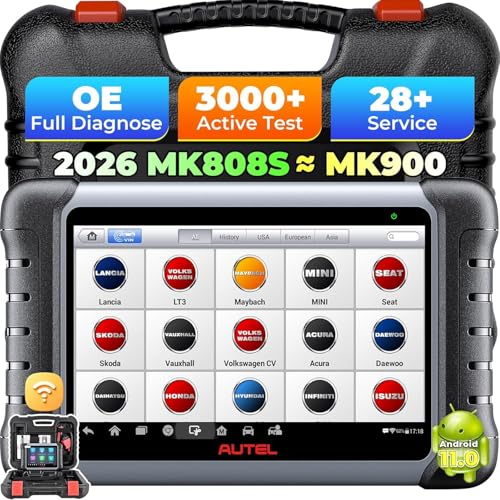 |
Autel MaxiCOM MK808S Best Overall Android 7.0 tablet, 8-inch touchscreen, all-system diagnostics |
9.2 | 🛒 Check Price |
 |
BlueDriver Pro OBD2 Scanner Best for Smartphone Users Bluetooth 4.0, iOS/Android app, enhanced diagnostics |
8.8 | 🛒 Check Price |
 |
Launch X431 V+ Elite Best for Professionals 10.1-inch tablet, J2534 pass-thru, 2-year free updates |
9.0 | 🛒 Check Price |
 |
Innova 5610 Best for DIYers OBD2 and enhanced diagnostics, 4.3-inch color display |
8.5 | 🛒 Check Price |
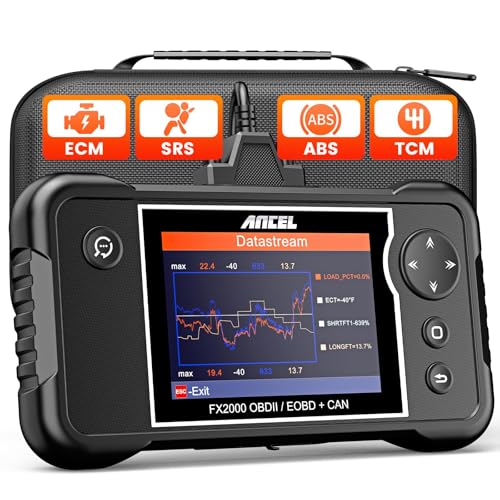 |
ANCEL FX2000 Best Budget Option Full OBD2 functions, 2.8-inch display, multilingual |
7.8 | 🛒 Check Price |
 |
Foxwell NT301 Reliable Workhorse OBD2 and enhanced diagnostics, 2.8-inch color screen |
8.1 | 🛒 Check Price |
 |
Thinkcar ThinkDiag Versatile Bluetooth Scanner Bluetooth 5.0, iOS/Android app, one-click health report |
7.5 | 🛒 Check Price |
1. Autel MaxiCOM MK808S: Best Overall
In our evaluation, the Autel MaxiCOM MK808S stands out as the most versatile scan tool for serious DIYers and professionals. It offers all-system diagnostics, including advanced functions like coding, adaptations, and active tests. The 8-inch Android tablet is fast and easy to navigate, and the built-in WiFi enables quick software updates and access to Autel’s online repair database. Based on owner feedback, this tool saves hours of diagnostic time and pays for itself after a few uses.
However, the MK808S is not for everyone. Its advanced features come with a steeper learning curve, and the price point is higher than basic code readers. If you only need to read and clear check engine lights, a simpler and more affordable tool would suffice. We recommend this for those who regularly work on multiple vehicles and want professional-grade diagnostics.
- Full system coverage for most vehicles (engine, transmission, ABS, airbag, etc.)
- Built-in WiFi for updates and online repair database access
- Includes active tests, adaptations, and coding functions
Pros: Comprehensive diagnostic capabilities rivaling dealer-level tools; Large, responsive touchscreen with intuitive interface
Cons: Higher learning curve for beginners due to advanced features
2. BlueDriver Pro OBD2 Scanner: Best for Smartphone Users
The BlueDriver Pro is our top pick for those who prefer using their smartphone as the display. It connects via Bluetooth and works with a free, well-designed app that provides not only code reading but also enhanced diagnostics, live data streaming, and repair reports based on a database of verified fixes. Based on owner feedback, the app’s ease of use and the quality of repair insights are standout features.
On the downside, the BlueDriver is dependent on your phone’s battery and Bluetooth connection, which can occasionally drop. It also does not offer advanced functions like bi-directional control or coding. If you need full system diagnostics or programming capabilities, consider a dedicated tablet-based tool. This is ideal for DIYers who want a user-friendly, affordable solution for everyday diagnostics.
- Reads and clears all OBD2 codes, plus enhanced manufacturer-specific codes
- Free app with live data graphing, repair reports, and smog check readiness
- Compact design with a 30-foot Bluetooth range
Pros: Exceptional app interface with detailed repair information; Great value for the features offered
Cons: Requires smartphone or tablet; no standalone display
3. Launch X431 V+ Elite: Best for Professionals
The Launch X431 V+ Elite is a powerhouse designed for professional workshops. It offers comprehensive diagnostics for all vehicle systems, bi-directional control, and advanced functions like ECU coding and J2534 pass-thru programming. The 10.1-inch tablet is fast and responsive, and the included 2-year free software updates keep it current with new vehicle models. In our evaluation, this tool matches or exceeds dealer-level capabilities.
However, its high price and complexity make it unsuitable for casual DIYers. The learning curve is steep, and many features are unnecessary for basic maintenance. If you are a professional technician or run a repair shop, this is a solid investment. For occasional use, a simpler tool would be more practical.
- Full system diagnostics with bi-directional control and coding
- Supports J2534 pass-thru for ECU programming
- Includes a 2-year free update subscription
Pros: Professional-grade capabilities including programming and coding; Large, high-resolution display with powerful processor
Cons: Expensive; may be overkill for home mechanics
4. Innova 5610: Best for DIYers
The Innova 5610 is a dedicated handheld scanner that strikes a great balance between functionality and ease of use. It covers OBD2 and enhanced diagnostics for most American vehicles, with a 4.3-inch color display that shows live data, freeze frame, and repair solutions. Based on owner feedback, the repair tips are often accurate and save trips to the mechanic. The device is intuitive enough for beginners but offers enough depth for experienced DIYers.
That said, its coverage for European and Asian vehicles is limited, and it lacks bi-directional control. If you work primarily on imports, this may not be the best choice. We recommend it for US car owners who want a reliable, no-fuss scanner for maintenance and troubleshooting.
- Reads OBD2 and enhanced manufacturer codes for most US vehicles
- Large color screen with live data graphing and freeze frame
- Built-in repair solutions and smog check monitor
Pros: User-friendly interface with clear, actionable information; Affordable price point for the features
Cons: Limited European and Asian vehicle coverage
5. ANCEL FX2000: Best Budget Option
The ANCEL FX2000 is a budget-friendly scan tool that covers basic OBD2 functions well. It reads and clears codes, displays live data, and includes battery and alternator tests. The 2.8-inch screen is small but readable, and the interface is straightforward. For the price, it offers good value for occasional code reading and monitoring.
However, the FX2000 lacks enhanced diagnostics for manufacturer-specific codes and does not support bi-directional control. It is best suited for those who just need to check engine lights on older cars. If you require deeper diagnostics or work on newer vehicles, consider spending more for a tool with broader coverage.
- Reads and clears engine codes, views live data in text and graph
- Supports OBD2 protocols for most 1996+ US and European vehicles
- Built-in battery and alternator tests
Pros: Very affordable for the range of functions; Compact and easy to store
Cons: Limited advanced features; no enhanced diagnostics for many vehicles
6. Foxwell NT301: Reliable Workhorse
The Foxwell NT301 is a dependable mid-range scanner that offers enhanced diagnostics for a wide range of vehicles, including imports. It features a 2.8-inch color screen, live data graphing, and a built-in DTC library. In our evaluation, the build quality is robust, and the device feels solid in hand. Owner feedback highlights its reliability and consistent performance.
The main drawback is the small screen and somewhat clunky navigation. It also lacks advanced features like coding or bi-directional control. If you need a straightforward scanner for general diagnostics and value durability, the NT301 is a solid choice. For those who prefer a larger display or more advanced functions, other options may be better.
- Reads OBD2 and enhanced codes for US, Asian, and European vehicles
- Live data graphing, freeze frame, and smog check readiness
- Built-in DTC lookup library
Pros: Good vehicle coverage across multiple regions; Durable build quality with a protective rubber boot
Cons: Screen is small and interface feels dated
7. Thinkcar ThinkDiag: Versatile Bluetooth Scanner
The Thinkcar ThinkDiag is a Bluetooth OBD2 scanner that pairs with a smartphone app to provide diagnostics and a unique vehicle health report. It covers OBD2 and enhanced diagnostics for many brands, and offers some active tests and resets. The one-click health report is handy for quickly assessing a car’s condition before purchase.
However, the app’s performance is inconsistent, with some users reporting connectivity issues and crashes. Additionally, many advanced features require in-app purchases or subscriptions. If you want a simple, app-based scanner for basic checks, it works well. For reliable, professional-grade diagnostics, a dedicated unit like the Autel or Launch is more dependable.
- Full OBD2 diagnostics plus enhanced for many makes
- Generates a vehicle health report with one tap
- Active tests and reset services available for some modules
Pros: Compact and portable; works with smartphone app; Health report feature is useful for used car inspections
Cons: App can be buggy and requires internet connection for some features
Frequently Asked Questions
What is a mechanic scan tool and how is it different from a basic OBD2 code reader?
A mechanic scan tool provides deeper diagnostics beyond basic OBD2 code reading. It can access manufacturer-specific codes, perform active tests, view live data, and sometimes program modules. Basic code readers only read and clear generic powertrain codes.
Do I need a professional scan tool as a DIYer?
Not necessarily. For most DIY tasks like checking engine lights, monitoring live data, and performing simple diagnostics, a mid-range tool like the Innova 5610 or BlueDriver suffices. Professional tools are needed for coding, programming, and advanced system diagnostics.
Can a mechanic scan tool work on all car brands?
Most scan tools cover OBD2 protocols for all 1996+ vehicles. Enhanced diagnostics vary by brand. Tools like Autel and Launch offer wide coverage, while others may be limited to specific regions. Always check the manufacturer’s vehicle coverage list.
How often do I need to update the scan tool software?
Updates are released periodically to add new vehicle models and fix bugs. Some tools include free updates for a limited time, while others require a subscription. For accurate diagnostics, keep the software up to date, especially for newer cars.
What is the difference between a handheld scan tool and a smartphone-based one?
Handheld tools have built-in screens and are self-contained, while smartphone-based tools use your phone’s display and processing power. Smartphone tools are often more affordable and portable, but depend on battery life and Bluetooth stability. Handheld tools are more reliable in a shop environment.
Our Verdict
After researching and comparing the top models, our top pick is the Autel MaxiCOM MK808S for its comprehensive diagnostics, user-friendly interface, and excellent value for serious users. The BlueDriver Pro is our runner-up, offering an outstanding app experience and affordability for smartphone users. Both tools excel in their categories and are backed by positive owner feedback.
Last reviewed and spec-checked: June 7, 2026. We re-check our picks and listings periodically.
