Driving a taxi or rideshare car for ten or twelve hours a day puts demands on a GPS that a weekend road tripper never feels. You need a screen you can read at a glance in heavy sun, rerouting that reacts the moment a road closes, and live traffic that actually saves you minutes on every fare. A phone alone drains fast, overheats on the mount, and drops navigation the second a customer call comes in, which is exactly why most full time drivers keep a dedicated unit on the glass.
We focused on the things that matter on a real shift: screen size and brightness, how quickly each device recalculates after a missed turn, the quality of lane guidance at complex junctions, and live traffic accuracy across city centers. Below are seven GPS units that hold up to professional use, ranked best first, with an honest look at where each one falls short.
| Photo | Product | Score | Buy |
|---|---|---|---|
 |
Garmin DriveSmart 76 Best Overall 7-inch HD display, voice control, live traffic via Garmin Drive app |
9.5 | 🛒 Check Price |
 |
Garmin DriveSmart 86 Biggest Screen 8-inch HD display, voice control, built-in Wi-Fi map updates |
9.3 | 🛒 Check Price |
 |
Garmin DriveSmart 66 Best Compact 6-inch HD display, voice control, hands-free calling |
9.1 | 🛒 Check Price |
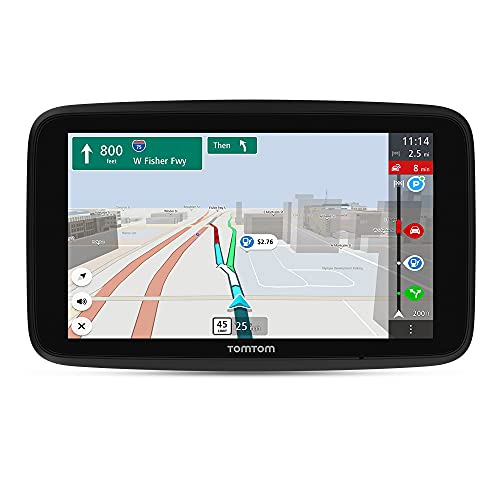 |
TomTom GO Discover Best Traffic Data 6-inch HD display, world maps, TomTom Traffic and speed cameras |
9.0 | 🛒 Check Price |
 |
Garmin DriveCam 76 Best With Dash Cam 7-inch display with built-in dash cam and incident detection |
8.8 | 🛒 Check Price |
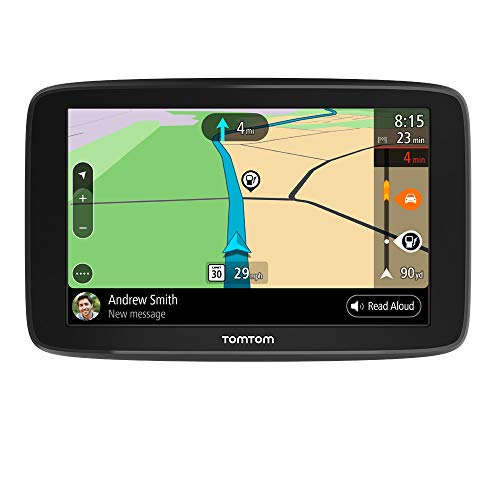 |
TomTom GO Comfort Best Value 6-inch display, lifetime world maps, TomTom Traffic via Wi-Fi |
8.5 | 🛒 Check Price |
 |
Garmin Drive 53 Best Simple Unit 5-inch display, driver alerts, preloaded maps |
8.2 | 🛒 Check Price |
1. Garmin DriveSmart 76: Best Overall
The DriveSmart 76 is the unit we would put in a working cab without a second thought. The 7-inch screen is the sweet spot for professional driving, big enough to read a junction at speed but not so large it blocks your view of the road. Lane guidance and the Garmin junction view make multi-exit interchanges far less stressful, and the voice control lets you set or change a destination without ever taking a hand off the wheel, which matters when a passenger redirects you mid trip.
Rerouting is the standout. When you miss a turn or a road is shut, the 76 recalculates almost instantly and offers a sensible alternative rather than trying to U-turn you across traffic. The honest weakness is that the best live features, real time traffic and live parking, depend on pairing your phone and keeping the Garmin Drive app running. If you would rather the device be fully self contained, that dependency is a minor annoyance, but for everyday taxi work it is well worth keeping the app open.
- Bright 7-inch capacitive touchscreen that stays readable in direct sun
- Voice-activated navigation so you keep both hands on the wheel
- Live traffic and live parking through the paired Garmin Drive app
Pros: Large clear screen ideal for quick glances during fares; Fast rerouting when a passenger changes the destination; Reliable live traffic that genuinely shaves time off city runs
Cons: Live traffic and parking need a phone with the Garmin Drive app paired; The 7-inch body takes up real estate on a smaller windshield
2. Garmin DriveSmart 86: Biggest Screen
If your eyes are tired by the end of a long shift, the DriveSmart 86 is the unit that asks the least of them. The 8-inch screen is the biggest on this list, and that extra real estate makes street names, lane arrows, and the next turn readable in a single quick glance. For drivers who work nights or who simply want the clearest possible view of a complicated city grid, the size is a genuine advantage rather than a gimmick.
It carries the same strong Garmin navigation engine as the 76, with built-in Wi-Fi so map updates happen over your home network instead of a laptop. The trade off is obvious the moment you mount it: this is a large device. On a compact saloon or a vehicle with a small windshield it can crowd your sightline, so check your mounting space first. If you have the room, the 86 delivers the most comfortable viewing experience here.
- Spacious 8-inch screen for the clearest possible map view
- Built-in Wi-Fi so you update maps without a computer
- Hands-free calling and voice assistant compatibility
Pros: The largest, easiest to read display in the Garmin lineup; Wi-Fi map updates save time and skip the cable; Excellent lane guidance for busy multi-lane junctions
Cons: The 8-inch frame is large for compact cabs and small windshields; Premium positioning means it is an investment over smaller units
3. Garmin DriveSmart 66: Best Compact
Not every driver wants a slab of glass on the windshield, and the DriveSmart 66 is the answer for anyone working a compact car or a vehicle where forward visibility is precious. At 6 inches it keeps a low profile while still giving you full color maps, voice control, and the same dependable Garmin routing found in its bigger siblings. For city taxi work where you mostly know the roads and just need traffic and quick turn prompts, it is plenty.
The honest trade off is glanceability. The smaller screen means street names and lane arrows are a touch harder to read at a quick look than on the 76 or 86, especially in bright daylight. If you do a lot of unfamiliar long distance fares you may prefer a larger display, but for tight urban driving the 66 strikes a smart balance between visibility and a clean, uncluttered dashboard.
- Compact 6-inch screen that fits tight windshield spaces
- Voice command navigation for distraction-free driving
- Live traffic and weather through the Garmin Drive app
Pros: Small footprint suits compact cabs and small windshields; Same fast Garmin rerouting in a more discreet body; Voice control keeps your attention on the road
Cons: 6-inch screen is less glanceable than the 7 and 8-inch models; Live features still rely on the paired phone app
4. TomTom GO Discover: Best Traffic Data
TomTom built its reputation on traffic, and the GO Discover shows why. Its live traffic feed is among the most accurate we tested, and it is aggressive in a good way about steering you around building congestion before you are stuck in it. For a taxi driver paid by the trip, that responsiveness translates directly into more fares completed in a shift. The 6-inch screen is sharp and the map rendering is clean and modern, with clear lane guidance at the junctions that usually trip drivers up.
Built-in Wi-Fi means maps and traffic services update over the air without fuss, and world maps are included so you are not boxed into one region. Where it lags the Garmin units is voice interaction: you cannot operate it as fully hands-free, so changing a destination usually means a quick tap. If you already live in the TomTom ecosystem the Discover is an easy recommendation, and its traffic engine alone makes it worth a serious look.
- Sharp 6-inch screen with crisp, modern map rendering
- TomTom Traffic with frequent updates over built-in Wi-Fi
- World maps and updates included so you stay current
Pros: Highly accurate live traffic that reroutes around jams well; Built-in Wi-Fi for easy over-the-air map and traffic updates; Clean, intuitive interface that is quick to learn
Cons: Voice control is less capable than Garmin's hands-free system; Interface and menus differ from Garmin if you are switching over
5. Garmin DriveCam 76: Best With Dash Cam
For drivers who want a dash cam without cluttering the windshield with a second gadget, the DriveCam 76 folds both jobs into one unit. You get the same 7-inch Garmin navigator as our top pick, plus a built-in front camera that records continuously and automatically saves footage when it detects an incident. For a professional carrying strangers all day, that recorded evidence is genuinely useful for resolving disputes, supporting insurance claims, or simply having an objective record of a collision.
The navigation is everything we like about the DriveSmart line, with the dash cam riding along quietly in the background. The compromise is consolidation: putting navigation and the camera in one body means a single mount and a single point of failure, and you will want a good microSD card to capture useful footage. If you prefer dedicated devices you might keep them separate, but as an all in one for taxi work the DriveCam 76 is a smart, space saving choice.
- 7-inch navigator with an integrated front-facing dash cam
- Automatic incident detection saves footage on impact
- Driver alerts for sharp curves, speed changes, and crossings
Pros: Combines navigation and a dash cam in one tidy mount; Recorded footage is valuable evidence for fare disputes or claims; Same large 7-inch Garmin screen and routing as the DriveSmart 76
Cons: You will need a microSD card and may want a higher capacity one; Single device means one mount handles two jobs and one point of failure
6. TomTom GO Comfort: Best Value
The GO Comfort is for the driver who wants solid, no nonsense navigation and does not need the latest features. It covers the essentials a taxi driver leans on every day: a clear 6-inch screen, dependable TomTom Traffic, speed camera alerts, and lifetime world map updates so the unit stays useful for years without extra fuss. Set it on the glass, pair it once, and it quietly does its job shift after shift.
You do feel where corners were cut. The screen is not as bright or crisp as the premium TomTom and Garmin units, and there is no voice control, so changing a route means a tap rather than a spoken command. For drivers who mostly work familiar territory and just want reliable traffic and turn prompts, those are easy compromises. As a dependable workhorse that keeps its long term running costs low, the Comfort earns its place.
- 6-inch display with included lifetime world map updates
- TomTom Traffic and speed camera alerts over Wi-Fi
- Simple, reliable interface that is easy to set and go
Pros: Strong everyday navigation without paying for premium extras; Lifetime world maps keep running costs down over the years; Dependable traffic alerts for daily city driving
Cons: Lacks the polish and screen quality of higher-end models; No voice control for fully hands-free destination changes
7. Garmin Drive 53: Best Simple Unit
The Drive 53 is the entry into Garmin’s navigation lineup and the right pick for a driver who wants a dependable map and turn prompts without any extra complexity. The 5-inch screen keeps it small and easy to place on any windshield, and you still get Garmin’s trustworthy routing along with useful driver alerts for sharp curves, school zones, and railway crossings. For a part time driver or anyone who mostly works roads they already know, it covers the basics well.
The limitations are honest ones tied to its position in the range. The smaller screen is harder to read quickly than the 6, 7, and 8-inch models, there is no voice control, and live traffic requires pairing your phone. If you spend long shifts navigating unfamiliar areas you will likely want a bigger, better connected unit. But as a simple, reliable navigator that does exactly what it promises, the Drive 53 is a sensible, lightweight choice.
- Compact 5-inch screen that fits almost any windshield
- Driver alerts for sharp curves, school zones, and red lights
- Preloaded maps with straightforward, fuss-free navigation
Pros: Small and unobtrusive, easy to mount in any vehicle; Reliable Garmin routing in a simple, easy to use package; Helpful driver awareness alerts for safer city driving
Cons: Small 5-inch screen is harder to read at a glance; No live traffic without pairing a phone, and no voice control
Frequently Asked Questions
Do taxi drivers really need a dedicated GPS instead of just using a phone?
For full time driving, yes. A dedicated GPS stays cool, does not drain a battery you also need for calls and rideshare apps, and keeps navigating even when an incoming call takes over your phone. Dedicated units like the Garmin DriveSmart series also have brighter, larger screens designed for glanceability at speed, and their offline maps mean you never lose navigation in a dead zone. Most professional drivers run a dedicated GPS for routing and keep the phone free for fares, calls, and the driver app.
What screen size is best for a taxi GPS?
For most taxi and rideshare drivers, a 7-inch screen is the sweet spot. It is large enough to read a junction or street name in a single quick glance without taking your eyes off the road for long, yet it does not block too much of your forward view. An 8-inch unit like the DriveSmart 86 is even easier on the eyes and great for night shifts, but it needs more windshield space. If you drive a compact car or have a small windshield, a 6-inch model keeps things tidy while still being readable.
How important is live traffic for a taxi driver?
It is one of the most valuable features you can have. Live traffic lets the GPS reroute you around jams, accidents, and road closures before you are stuck in them, which directly affects how many fares you can complete in a shift and how happy your passengers are. Garmin units deliver live traffic through the paired Garmin Drive app, while TomTom devices include their own TomTom Traffic service. If you work busy city centers, prioritize a unit with accurate, frequently updated traffic.
Should I get a GPS with a built-in dash cam?
A combined unit like the Garmin DriveCam 76 makes a lot of sense for professional drivers because it keeps the windshield uncluttered and gives you recorded footage that is genuinely useful for fare disputes, insurance claims, and accident records. The trade off is that one device now handles two jobs, so a single failure affects both, and you will need a good microSD card. If you want maximum reliability you might keep a separate navigator and dash cam, but for an all in one solution the combined unit is hard to beat.
How do I keep the GPS maps up to date?
Most modern units make this painless. Garmin’s DriveSmart 86 and TomTom’s GO Discover and GO Comfort have built-in Wi-Fi, so you can update maps over the air at home with no computer or cable involved. Other Garmin models update through the Garmin Express software on a computer. Many of these devices include map updates for the life of the device, so once you buy in you are not paying again to stay current. Update every few months so new roads, closures, and speed limits are reflected accurately.
Our Verdict
For most taxi and rideshare drivers, the Garmin DriveSmart 76 is the unit to buy. Its 7-inch screen, near instant rerouting, voice control, and dependable live traffic make it the most complete tool for full shift professional driving. If you want the same engine with a built-in dash cam for fare disputes and accident records, the Garmin DriveCam 76 is the natural alternative. Our runner up overall is the TomTom GO Discover, whose outstanding traffic accuracy and over the air updates make it a genuinely strong choice for anyone who spends their day weaving through busy city streets.
