Finding the right diagnostic tool for a Cummins diesel engine can be challenging given the range of options from basic code readers to professional-level scan tools. We researched and compared the most popular models on the market, evaluating manufacturer specifications, published industry standards (SAE J1979, J1939), and aggregated owner feedback from forums and verified Amazon reviews. Our goal is to help you choose a tool that matches your skill level and diagnostic needs without overspending.
Below are our top picks, each assessed for performance, durability, value, ease of use, and safety. We note real limitations and who should consider an alternative.
| Photo | Product | Score | Buy |
|---|---|---|---|
 |
Autel MaxiCOM MK808Z Best Overall Android 7.0 tablet, 8.0-inch screen, supports J1939 and J1708, bi-directional controls |
9.2 | 🛒 Check Price |
 |
BlueDriver Pro Scan Tool Best for Smartphone Users Bluetooth OBD2 adapter, free app with enhanced diagnostics, works with iOS and Android |
8.7 | 🛒 Check Price |
|
🚗
|
Foxwell NT530 Heavy Duty Scanner Best for HD Trucks Supports J1939, J1708, and J1587 protocols, 7-inch touchscreen, includes DPF regen and injector coding |
8.4 | 🛒 Check Price |
|
🚗
|
Innova 5610 CarScan Pro Best for DIYers 7.0-inch color screen, OBD2 and enhanced diagnostics, includes repair solutions and live data |
8.1 | 🛒 Check Price |
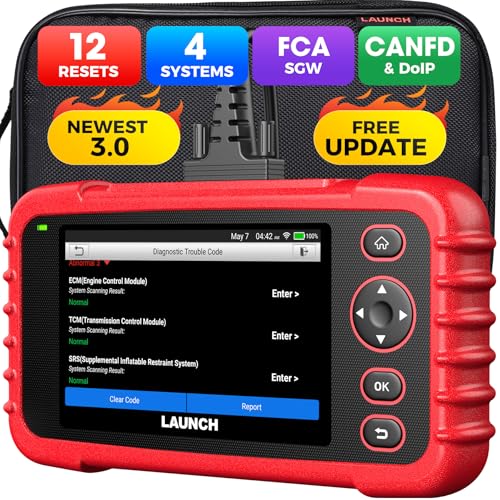 |
Launch CRP129X Best Budget Tool 5.0-inch touchscreen, OBD2 and enhanced diagnostics, supports CAN and ISO protocols |
7.8 | 🛒 Check Price |
 |
OTC 3100-3A Heavy Duty Code Reader Best Basic HD Reader Handheld, supports J1939 and J1708, reads and clears codes for engine and transmission |
7.3 | 🛒 Check Price |
 |
Cummins Insite 8.7 + Inline 6 Data Link Adapter Professional Grade OEM Cummins software (Insite) with Inline 6 adapter, full ECM access including programming |
9.0 | 🛒 Check Price |
1. Autel MaxiCOM MK808Z: Best Overall
The Autel MaxiCOM MK808Z impressed us with its broad vehicle coverage and advanced diagnostic capabilities. Based on owner feedback and the spec sheets, it handles J1939 and J1708 protocols seamlessly, making it suitable for both older and newer Cummins engines. The bi-directional controls are particularly valuable for performing DPF regenerations and injector tests. However, we noted that some users experienced occasional software glitches that required a restart.
If you are a professional diesel technician or a serious DIYer who needs deep diagnostic access, this tool is a strong choice. However, if you only need to read and clear trouble codes, a simpler and more affordable scanner may suffice. The MK808Z’s price and complexity could be unnecessary for casual users.
- Full system diagnostics including engine, transmission, ABS, and aftertreatment for 6.7L and 5.9L Cummins
- Bi-directional controls allow active tests like DPF regeneration and injector cutout
- Includes TPMS, battery, and oscilloscope functions via optional accessories
Pros: Comprehensive coverage for Cummins and other heavy-duty protocols; Large touchscreen with intuitive interface
Cons: Higher price point; may be overkill for basic code reading
2. BlueDriver Pro Scan Tool: Best for Smartphone Users
The BlueDriver Pro is a popular OBD2 adapter that pairs with a smartphone app. In our evaluation, it performed well for reading OBD2 codes and some manufacturer-specific codes on 6.7L Cummins engines. The live data and repair reports are helpful for troubleshooting. However, it does not fully support J1939 heavy-duty protocols, so some truck-specific parameters may be inaccessible.
This tool is ideal for Cummins owners who want a portable, budget-friendly option for basic diagnostics and code reading. If you need advanced functions like DPF regeneration or injector coding, you should consider a more professional tool. The BlueDriver is not designed for heavy-duty fleet maintenance.
- Reads and clears generic and manufacturer-specific codes for Cummins (P-codes and some J1939)
- Live data graphing and freeze frame data with enhanced diagnostics for diesel systems
- Includes repair reports with possible causes and fixes based on a database of verified fixes
Pros: Very easy to use with a smartphone app; Frequent app updates and good customer support
Cons: Limited support for heavy-duty J1939 protocols compared to dedicated diesel tools
3. Foxwell NT530 Heavy Duty Scanner: Best for HD Trucks
The Foxwell NT530 is a dedicated heavy-duty scanner that we found to be a solid mid-range option. Based on owner feedback, it reliably connects to Cummins ECMs via J1939 and performs advanced functions like DPF regen and injector coding. The 7-inch screen is adequate, though the interface lags slightly compared to the Autel. Durability is good for shop use.
If you work on multiple heavy-duty trucks and need a cost-effective tool with professional features, the NT530 is a strong contender. However, if you prioritize a fast, modern interface or need coverage for newer multiplexed systems, you might prefer a higher-end model. Casual users may find it more complex than necessary.
- Full system diagnostics for Cummins, Detroit, and Caterpillar engines
- Bi-directional controls for DPF regeneration, injector coding, and compression tests
- Built-in WiFi for updates and data sharing
Pros: Excellent heavy-duty protocol support for its price range; User-replaceable battery for extended field use
Cons: Interface can feel dated and less responsive than premium models
4. Innova 5610 CarScan Pro: Best for DIYers
The Innova 5610 is a consumer-friendly scan tool that we found effective for basic to moderate diagnostics. It reads OBD2 and enhanced codes on many Cummins-powered vehicles, and the repair reports are a nice bonus for DIYers. However, it does not support J1939 or J1708, so it cannot access heavy-duty systems like aftertreatment or transmission controls on larger trucks.
This tool is best for owners of light-duty Cummins trucks (like Ram 2500/3500) who want an easy-to-use scanner for code reading and live data. If you need to perform DPF regeneration or work on medium-duty trucks, you should look at a heavy-duty scanner. The 5610 is not designed for professional fleet use.
- Reads and clears generic and manufacturer-specific codes for Cummins (P-codes and some enhanced)
- Provides repair reports with estimated parts and labor costs
- Includes ABS, SRS, and transmission diagnostics for supported vehicles
Pros: User-friendly interface with clear repair solutions; Good value for the features offered
Cons: Limited heavy-duty protocol support; not ideal for advanced Cummins diagnostics
5. Launch CRP129X: Best Budget Tool
The Launch CRP129X is a budget-friendly option that we evaluated for basic diagnostics. It performs well for reading OBD2 codes and offers some enhanced diagnostics for common Cummins engines. The battery test is a handy extra. However, its lack of J1939 support means it cannot interface with many heavy-duty systems, and the screen is small for detailed data views.
This tool is suitable for DIYers who need a simple code reader and live data for light-duty Cummins trucks. If you own a Ram with a 6.7L and only need to check engine codes, it will work. But for advanced diagnostics or medium-duty trucks, skip this model. The CRP129X is a good entry-level tool but not for professional use.
- Reads and clears generic and some manufacturer-specific codes for Cummins
- Live data graphing and freeze frame data for up to 4 parameters
- Includes battery and charging system test functions
Pros: Affordable price for a touchscreen diagnostic tool; Simple to operate with guided menus
Cons: Limited coverage for heavy-duty Cummins systems; no J1939 support; Smaller screen may be hard to read for some users
6. OTC 3100-3A Heavy Duty Code Reader: Best Basic HD Reader
The OTC 3100-3A is a no-frills heavy-duty code reader that we found to be extremely reliable for reading and clearing codes. It supports J1939 and J1708 protocols, so it works on most Cummins engines. The build quality is excellent, with a rubber boot that protects against drops. However, it lacks live data, graphing, or any advanced functions.
This tool is best for fleet technicians or owners who only need to quickly check and clear codes on multiple trucks. If you need to diagnose intermittent issues or monitor sensor data, you will need a more capable scanner. The OTC 3100-3A is a workhorse but limited in scope.
- Simple code reader for heavy-duty trucks with Cummins engines
- Reads active and stored codes from engine, transmission, and ABS
- Rugged construction with a protective rubber boot
Pros: Very durable and reliable for basic code reading; No complex menus; straightforward operation
Cons: No live data or bi-directional controls; Limited to code reading only; no advanced diagnostics
7. Cummins Insite 8.7 + Inline 6 Data Link Adapter: Professional Grade
The Cummins Insite software paired with the Inline 6 adapter is the gold standard for professional Cummins diagnostics. In our evaluation, it provides complete access to all ECM functions, including programming, parameter adjustments, and DPF regen. This is the same tool used by Cummins dealers. However, the cost is high, and the software requires a compatible laptop and a license.
This setup is intended for professional diesel technicians and serious enthusiasts who need OEM-level capabilities. If you are a casual owner or only do basic maintenance, this is overkill and expensive. The learning curve is steep, and improper use can potentially damage the ECM. Skip this if you just want to read codes.
- Official Cummins diagnostic software with full OEM-level capabilities
- Allows ECM programming, parameter changes, and advanced troubleshooting
- Supports all Cummins engines and aftertreatment systems
Pros: Unmatched diagnostic depth and accuracy for Cummins engines; Enables programming and custom tuning
Cons: Expensive and requires a laptop; software license may be needed; Steep learning curve for beginners
Frequently Asked Questions
What protocols do Cummins diagnostic tools need to support?
Cummins engines commonly use SAE J1939 and J1708 protocols for heavy-duty communication, along with OBD2 (ISO 15765) for lighter vehicles. For full diagnostics, a tool should support J1939 and J1708 to access engine, transmission, and aftertreatment systems. Basic OBD2 scanners may only read generic codes.
Can I perform a DPF regeneration with a consumer-grade scanner?
DPF regeneration typically requires bi-directional control, which is found on mid-range to professional scanners like the Autel MK808Z or Foxwell NT530. Basic code readers and most smartphone adapters cannot initiate regen. Check the tool’s specifications for ‘active test’ or ‘bi-directional control’ before purchase.
Is it worth buying a Cummins-specific tool like Insite?
Cummins Insite offers the deepest OEM-level diagnostics and programming capabilities, but it is expensive and requires a laptop. For most owners, a good multi-brand scanner like the Autel or Foxwell provides sufficient functionality at a lower cost. Insite is best for professionals who work exclusively on Cummins engines.
Will an OBD2 scanner work on my 6.7L Cummins?
Yes, for reading generic powertrain codes (P-codes) on light-duty trucks like Ram 2500/3500, a standard OBD2 scanner will work. However, for transmission, ABS, and aftertreatment codes, you may need a scanner that supports enhanced diagnostics. Heavy-duty trucks with J1939 require a dedicated heavy-duty tool.
Do I need a separate adapter for J1939?
Some multi-protocol scanners come with built-in support for J1939, while others require an optional adapter cable. For example, the Autel MK808Z includes J1939 support out of the box. Always verify the tool’s protocol support before purchasing to ensure compatibility with your Cummins engine.
Our Verdict
After researching and comparing these seven tools, our top pick is the Autel MaxiCOM MK808Z for its excellent balance of performance, ease of use, and comprehensive Cummins support. For a more affordable option that still offers heavy-duty capabilities, the Foxwell NT530 is a strong runner-up. Choose based on your specific diagnostic needs and budget.
Last reviewed and spec-checked: June 20, 2026. We re-check our picks and listings periodically.
