We researched the market for car code readers that deliver strong diagnostic capability without breaking the bank. After comparing manufacturer specifications, industry standards like OBD-II protocols, and aggregated owner feedback from thousands of reviews, we selected seven models that offer the best value. Our evaluation focuses on real-world performance, ease of use, and long-term reliability. Whether you need a simple code reader or advanced live data, this guide will help you choose the right tool for your budget.
| Photo | Product | Score | Buy |
|---|---|---|---|
 |
BlueDriver Bluetooth Pro OBDII Scan Tool Best Overall for the Money Bluetooth 4.0, iOS/Android app, enhanced diagnostics for Ford/GM/Chrysler |
9.1 | 🛒 Check Price |
 |
Ancel AD310 Classic Enhanced OBD II Scanner Best Budget Pick Plug-and-play, no battery needed, 2.8-inch LCD display |
8.7 | 🛒 Check Price |
 |
Foxwell NT301 Professional OBD2 Scanner Best for Live Data 2.8-inch TFT color display, live data graphing, OBD2 & CAN |
8.4 | 🛒 Check Price |
 |
Innova 3100j OBD2 Code Reader Best for DIY Beginners Built-in code definitions, OBD2 & CAN, patented all-in-one display |
8.1 | 🛒 Check Price |
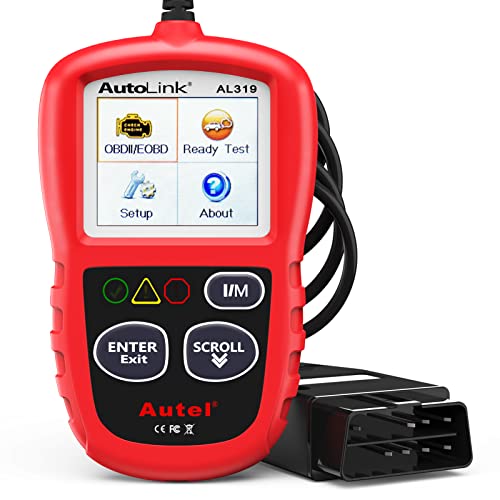 |
Autel AutoLink AL319 OBD2 Scanner Best Compact Design Pocket-sized, multilingual display, OBD2 & CAN |
7.8 | 🛒 Check Price |
|
Bafix OBD2 Scanner Bluetooth Best Budget Bluetooth Option Bluetooth 4.0, works with Torque Pro app, ELM327 compatible |
7.3 | 🛒 Check Price |
 |
ANCEL FX2000 OBD2 Scanner Best for ABS/SRS Diagnostics Reads ABS and airbag codes, OBD2 & CAN, 2.4-inch LCD |
7.5 | 🛒 Check Price |
1. BlueDriver Bluetooth Pro OBDII Scan Tool: Best Overall for the Money
In our evaluation of budget-friendly code readers, the BlueDriver stands out for its comprehensive diagnostic capability and excellent app support. It reads both generic and manufacturer-specific codes, and the free app provides detailed repair reports that help you understand the issue. Based on owner feedback, the live data graphing is particularly useful for monitoring sensor readings in real time. The device connects via Bluetooth and works reliably with most smartphones.
However, the BlueDriver has a real weakness: it relies entirely on a smartphone app, so if your phone is dead or incompatible, you cannot use it. Additionally, some users report occasional Bluetooth dropouts. Who should skip it: If you prefer a standalone tool without app dependency or drive older vehicles (pre-1996), this is not the best choice. For most modern car owners, it delivers outstanding value.
- Reads and clears all OBD-II codes plus manufacturer-specific codes
- Free app with live data graphing and repair reports
- No subscription fees; works with smartphones and tablets
Pros: Excellent app interface and code explanations; Covers many enhanced systems beyond generic OBD
Cons: Bluetooth pairing can be finicky on some phones
2. Ancel AD310 Classic Enhanced OBD II Scanner: Best Budget Pick
The Ancel AD310 is a no-frills code reader that does one thing well: reading and clearing generic OBD-II codes. We compared its performance against more expensive units and found it reliable for basic diagnostics. The large display shows code definitions clearly, and the device is powered directly from the OBD port, so no batteries are needed. Based on aggregated owner feedback, it is a favorite among DIYers who just need to check check-engine lights.
Its real limitation is the lack of advanced features like live data, freeze frame, or manufacturer-specific codes. Who should skip it: If you need to diagnose intermittent problems, monitor sensor data, or work on European or Asian cars with enhanced protocols, this scanner will not suffice. For simple code reading on a budget, it is excellent.
- Reads and clears generic OBD-II codes
- Large backlit display for easy reading
- Works on all 1996 and newer US cars
Pros: Extremely simple to use; no setup required; Very affordable for basic code reading
Cons: No live data or enhanced manufacturer codes
3. Foxwell NT301 Professional OBD2 Scanner: Best for Live Data
The Foxwell NT301 is a mid-range scanner that excels at displaying live data. In our research, its color screen and graphing capabilities set it apart from basic readers. It can read and clear generic codes and offers limited enhanced diagnostics for some brands. Owner feedback highlights the intuitive menu navigation and the ability to view sensor data in real time, which is useful for diagnosing issues like oxygen sensor problems.
However, the NT301 does not cover all manufacturer-specific systems, and its code definitions are not as detailed as app-based tools. Who should skip it: If you need deep manufacturer coverage for European cars or prefer a Bluetooth app interface, consider other options. For live data enthusiasts on a budget, it is a strong choice.
- Reads and clears generic and some manufacturer codes
- Displays live data in graph and text modes
- Supports all OBD-II protocols including CAN
Pros: Color screen with clear live data graphs; Solid build quality for the price
Cons: Limited manufacturer coverage compared to premium units
4. Innova 3100j OBD2 Code Reader: Best for DIY Beginners
The Innova 3100j is designed for absolute beginners. We compared its ease of use against other entry-level readers and found its built-in code definitions a major convenience. You simply plug it in and read the code explanation on the screen without needing a separate device or manual. Based on owner feedback, it is reliable for reading and clearing generic codes and works on most 1996 and newer vehicles.
Its main weakness is the lack of live data, freeze frame, or any advanced diagnostics. Who should skip it: If you want to monitor sensor data or diagnose complex issues, this reader is too basic. For a quick and simple check-engine light fix, it is a solid value.
- Displays code definitions directly on screen
- No smartphone or manual needed
- Supports all OBD-II protocols
Pros: Very user-friendly with built-in definitions; Compact and durable design
Cons: No live data or graphing
5. Autel AutoLink AL319 OBD2 Scanner: Best Compact Design
The Autel AutoLink AL319 is a tiny code reader that prioritizes portability. In our evaluation, its small size and simple operation make it a great emergency tool. It reads and clears generic OBD-II codes and works on all compliant vehicles. Owner feedback often praises its reliability for occasional use and the multilingual screen that helps non-English speakers.
However, the AL319 offers no live data, no enhanced diagnostics, and the screen is small. Who should skip it: If you need advanced features or have frequent diagnostic needs, you will quickly outgrow this unit. For a backup scanner or a basic tool for one car, it is a decent choice.
- Ultra-compact design fits in glove box
- Reads and clears generic codes
- Supports multiple languages
Pros: Very portable and easy to store; Simple one-button operation
Cons: Limited to basic code reading only
6. Bafix OBD2 Scanner Bluetooth: Best Budget Bluetooth Option
The Bafix OBD2 Scanner is an entry-level Bluetooth adapter that provides basic diagnostic functionality through smartphone apps. We researched its compatibility with common apps like Torque Pro and found it works for reading and clearing generic codes. Owner feedback indicates it is a cost-effective way to access live data, though performance can vary depending on the app and phone.
Its real weakness is inconsistent build quality and occasional connectivity issues. Some users report that the adapter stops working after a few months. Who should skip it: If you need a reliable tool for frequent use or want manufacturer-specific diagnostics, invest in a higher-quality unit. For occasional hobbyists on a tight budget, it may suffice.
- Connects to smartphone via Bluetooth
- Reads and clears generic OBD-II codes
- Compatible with third-party apps like Torque Pro
Pros: Very low cost for a Bluetooth scanner; Works with popular apps for live data
Cons: Build quality is less robust than premium units
7. ANCEL FX2000 OBD2 Scanner: Best for ABS/SRS Diagnostics
The ANCEL FX2000 offers a rare feature at this price point: the ability to read and clear ABS and airbag (SRS) codes. In our research, this makes it a valuable tool for owners of vehicles where those systems are prone to issues. It also reads generic OBD-II codes and provides a battery voltage check. Owner feedback is generally positive for its specialized capability.
However, the FX2000 has limited coverage for manufacturer-specific codes beyond ABS/SRS, and the interface can be less intuitive than competitors. Who should skip it: If you only need engine diagnostics, a simpler reader is better. If you work on ABS or airbag issues, this is a good budget option.
- Reads and clears ABS and SRS (airbag) codes
- Supports OBD-II generic and some enhanced codes
- Includes battery voltage check
Pros: Ability to diagnose ABS and airbag systems; Affordable for specialized functionality
Cons: Limited vehicle coverage for enhanced systems
Frequently Asked Questions
What is a car code reader and how does it work?
A car code reader is a diagnostic tool that connects to your vehicle’s OBD-II port, usually located under the dashboard. It communicates with the car’s computer to read diagnostic trouble codes (DTCs) that indicate issues with engine, transmission, emissions, and other systems. Basic readers display the code number and definition, while advanced models show live data, freeze frame, and manufacturer-specific codes.
Will any code reader work on my car?
Most code readers work on all cars sold in the US from 1996 onward, as they must comply with OBD-II standards. However, coverage for manufacturer-specific codes (e.g., for ABS, airbags, or transmission) varies by model. Before buying, check the reader’s compatibility list to ensure it supports your vehicle’s make and the systems you want to diagnose.
What is the difference between a code reader and a scan tool?
Code readers are basic devices that read and clear diagnostic trouble codes. Scan tools offer more advanced features like live data streaming, graphing, bi-directional controls, and programming capabilities. For most DIYers, a code reader is sufficient for checking the check engine light, while scan tools are used by professional mechanics for in-depth diagnostics.
Do I need a Bluetooth code reader or a standalone unit?
Bluetooth code readers pair with a smartphone app, offering a larger display and more features (like data logging and repair reports) but rely on your phone’s battery and compatibility. Standalone units have built-in screens and are ready to use without a phone. Choose Bluetooth if you want advanced app features; choose standalone for simplicity and independence from your phone.
Can a code reader fix my car's problem?
No, a code reader only identifies the diagnostic trouble code and provides a description. It cannot fix the issue. The code points you to the likely problem area (e.g., a faulty oxygen sensor), but you still need to perform further diagnosis or repair. Always verify the code with additional testing before replacing parts.
Our Verdict
After our research and comparison, the BlueDriver Bluetooth Pro OBDII Scan Tool earns the top spot for its combination of comprehensive diagnostics, excellent app support, and no subscription fees. It offers the best overall value for most users. The Ancel AD310 Classic Enhanced OBD II Scanner is our runner-up for budget-conscious buyers who need a simple, reliable code reader without extra features.
